JRadioButton, 라디오버튼 컴포넌트
JRadioButton
JRadioButton을 이용하면 라디오버튼을 만들 수 있습니다. 라디오버튼은 생성, 메서드, 이벤트 처리에 있어 체크박스와 동일하지만, 한 가지 면에서 다릅니다. 체크박스는 독립적으로 선택/해제되지만, 라디오버튼은 여러 개가 하나의 버튼 그룹을 형성하고, 그룹 내에서 하나만 선택 가능합니다.
JRadioButton 컴포넌트의 생성
라디오버튼은 다음 생성자를 이용하여 생성하며, 디폴트가 해제 상태입니다.
JRadioButton() // 빈 체크박스
JRadioButton(Icon image) // 이미지 라디오버튼
JRadioButton(Icon image, boolean selected) // 이미지 라디오버튼
JRadioButton(String text) // 문자열 라디오버튼
JRadioButton(String text, boolean selected) // 문자열 라디오버튼
JRadioButton(String text, Icon image) // 문자열과  이미지를 가진 라디오버튼
JRadioButton(String text, Icon image, boolean selected) // 문자열과 이미지를 가진 라디오버튼- selected: true이면 선택 상태로 초기화, 디폴트는 해제 상태
버튼 그룹과 라디오버튼의 생성 과정
라디오버튼의 생성은 JRadioButton의 생성자를 호출하는 것으로 끝나지 않고, 4개의 과정이 필요합니다. 우선 ButtonGroup 클래스를 이용하여 라디오버튼들을 묶어 버튼 그룹 객체를 생성합니다. 그리고 나서 JRadioButton 생성자로 라디오 버튼을 생성하고 버튼 그룹에 추가합니다. 그리고 라디오 버튼을 화면에 출력하기 위해 컨테이너에 삽입합니다. 이제 버튼 그룹에 속한 라디오버튼 중 하나만 선택할 수 있습니다.
라디오버튼을 만드는 과정
1. 버튼 그룹 객체 생성
2. 라디오버튼 컴포넌트 생성
3. 라디오버튼을 버튼 그룹에 삽입
4. 라디오버튼을 컨테이너에 삽입
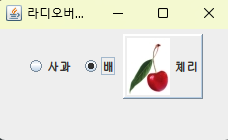
라디오버튼 생성 예
import javax.swing.*;
import java.awt.*;

public class RadioButtonEx extends JFrame {
    public RadioButtonEx() {
        setTitle("라디오버튼 만들기 예제");
        setDefaultCloseOperation(JFrame.EXIT_ON_CLOSE);
        Container c = getContentPane();
        c.setLayout(new FlowLayout());

        // 이미지 라디오버튼을 만들기 위해 2개의 이미지 객체 생성
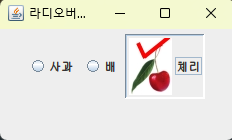
        ImageIcon cherryIcon = new ImageIcon("images/cherry.jpg"); // 해제 상태를 나태는 이미지
        ImageIcon selectedCherryIcon = new ImageIcon("images/selectedCherry.jpg"); // 선택 상태를 나타내는 이미지

        // 버튼 그룹 객체 생성
        ButtonGroup g = new ButtonGroup();

        // 라디오버튼 3개 생성
        JRadioButton apple = new JRadioButton("사과");
        JRadioButton pear = new JRadioButton("배", true);
        JRadioButton cherry = new JRadioButton("체리", cherryIcon); // 이미지 라디오버튼

        cherry.setBorderPainted(true); // 이미지 라디오버튼의 외곽선 출력
        cherry.setSelectedIcon(selectedCherryIcon); // 선택 상태 이미지 등록

        // 버튼 그룹에 3개의 라디오버튼 삽입
        g.add(apple);
        g.add(pear);
        g.add(cherry);

        // 컨텐트팬에 3개의 라디오버튼 삽입
        c.add(apple);
        c.add(pear);
        c.add(cherry);

        setSize(250,150);
        setVisible(true);
    }

    public static void main(String [] args) {
        new RadioButtonEx();
    }
}
[실행 결과]
JRadioButton과 Item 이벤트 처리
라디오버튼에 선택 상태가 변경되면 Item 이벤트가 발생합니다. 마우스와 키보드를 이용하거나 프로그램에서 JRadioButton의 setSelected()를 호출하여 선택 상태를 변경할 수 있습니다. 이 경우 모두 Item 이벤트가 발생합니다. Item 이벤트는 ItemListener 인터페이스의 다음 메소드에 의해 처리됩니다.
void ItemStateChanged(ItemEvent e)
// 라디오버튼의 선택 상태가 변경되었을 때 호출됩니다.
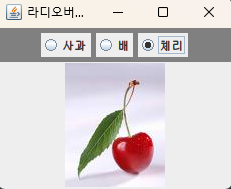
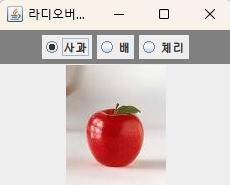
JRadioButton과 Item 이벤트를 이용하여 과일 사진을 보여주기
import javax.swing.*;
import java.awt.event.*;
import java.awt.*;

public class RadioButtonItemEventEx extends JFrame {
    private JRadioButton [] radio = new JRadioButton [3]; // 라디오버튼 배열
    private String [] text = {"사과", "배", "체리"}; // 라디오버튼의 문자열
    private ImageIcon [] image = { // 이미지 객체 배열
            new ImageIcon("images/apple.jpg"),
            new ImageIcon("images/pear.jpg"),
            new ImageIcon("images/cherry.jpg")};
    private JLabel imageLabel = new JLabel(); // 이미지가 출력될 레이블

    public RadioButtonItemEventEx() {
        setTitle("라디오버튼 Item Event 예제");
        setDefaultCloseOperation(JFrame.EXIT_ON_CLOSE);
        Container c = getContentPane();
        c.setLayout(new BorderLayout());

        JPanel radioPanel = new JPanel(); // 3개의 라디오버튼을 부착할 패널
        radioPanel.setBackground(Color.GRAY);

        ButtonGroup g = new ButtonGroup(); // 버튼 그룹 객체 생성
        for(int i=0; i<radio.length; i++) { // 3개의 라디오버튼에 대해
            radio[i] = new JRadioButton(text[i]); // 라디오버튼 생성
            g.add(radio[i]); // 버튼 그룹에 부착
            radioPanel.add(radio[i]); // 패널에 부착
            radio[i].addItemListener(new MyItemListener()); // 라디오버튼에 Item 리스너 등록
        }

        radio[2].setSelected(true); // 체리 라디오버튼을 선택 상태로 설정
        c.add(radioPanel, BorderLayout.NORTH); // 컨텐트팬의 NORTH에 라디오패널 부착
        c.add(imageLabel, BorderLayout.CENTER); // 컨텐트팬의 CENTER에 이미지 레이블 부착
        imageLabel.setHorizontalAlignment(SwingConstants.CENTER); // 이미지의 중앙 정렬

        setSize(250,200);
        setVisible(true);
    }

    // Item 리스너 작성
    class MyItemListener implements ItemListener {
        public void itemStateChanged(ItemEvent e) {
            if(e.getStateChange() == ItemEvent.DESELECTED)
                return; // 해제된 경우 그냥 리턴(잠깐 참고)
            if(radio[0].isSelected()) // 사과가 선택된 경우
                imageLabel.setIcon(image[0]);
            else if(radio[1].isSelected()) // 배가 선택된 경우
                imageLabel.setIcon(image[1]);
            else // 체리가 선택된 경우
                imageLabel.setIcon(image[2]);
        }
    }

    public static void main(String [] args) {
        new RadioButtonItemEventEx();
    }
}
[실행 결과]

'프로그래밍 언어 > JAVA' 카테고리의 다른 글
| JTextArea, 텍스트 영역 컴포넌트 (2) | 2025.07.07 |
|---|---|
| JTextField, 텍스트필드 컴포넌트 (0) | 2025.07.04 |
| JCheckbox, 체크박스 컴포넌트 (2) | 2025.06.28 |
| JButton, 버튼 컴포넌트 (1) | 2025.06.25 |
| JLabel, 레이블 컴포넌트 (0) | 2025.06.23 |


