도형 그리기와 칠하기
도형 그리기
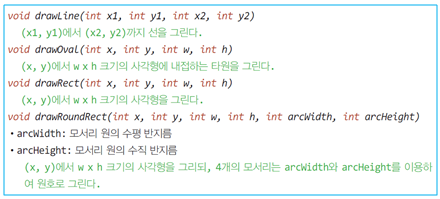
Grahics를 이용하여 선, 타원, 사각형, 둥근모서리사각형, 원호, 페다각형 등을 그릴 수 있습니다. 이 중에서 선, 원, 사각형을 그리는 메소드는 다음과 같습니다.
void drawLine(int x1, int y1, int x2, int y2)
// (x1, y1) 좌표부터 (x2, y2) 좌표까지 선을 그린다.

void drawRect(int x, int y, int width, int height)
// (x, y) 좌표에 width x height 크기인 사각형을 그린다.

void drawOval(int x, int y, int width, int height)
// (x, y) 좌표에 width x height 크기인 사각형에 내접하는 타원을 그린다.

void drawRoundRect(int x, int y, int width, int height, int acrWidth, int arcHeight)
// arcWidth : 모서리 원의 수평 반지름
// arcHeight : 모서리 원의 수직 반지름
// (x, y) 좌표에 width x height 크기인 사각형을 그리면서
// 사각형의 4개의 모서리는 arcWidth와 arcHeight를 이용하여 원호로 그린다.

Graphics의 drawLine() 메서드로 선 그리기
import javax.swing.*;
import java.awt.*;

public class GraphicsDrawLineEx extends JFrame {
    private MyPanel panel = new MyPanel();

    public GraphicsDrawLineEx() {
        setTitle("drawLine 사용 예제");
        setDefaultCloseOperation(JFrame.EXIT_ON_CLOSE);
        setContentPane(panel);

        setSize(200, 170);
        setVisible(true);
    }

    class MyPanel extends JPanel {
        public void paintComponent(Graphics g) {
            super.paintComponent(g);
            g.setColor(Color.RED); // 빨간색 선택
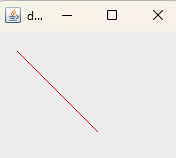
            g.drawLine(20, 20, 100, 100); // 선그리기
        }
    }

    public static void main(String[] args) {
        new GraphicsDrawLineEx();
    }
}
[실행결과]
원호와 폐다각형 그리기
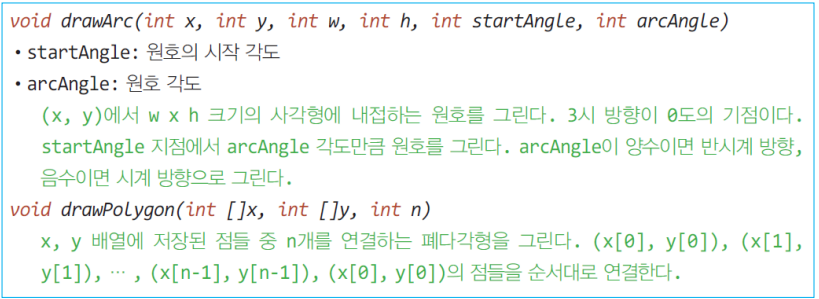
Graphics 클래스를 이용하여 원호와 폐다각형을 그리는 메서드는 각각 다음과 같습니다.
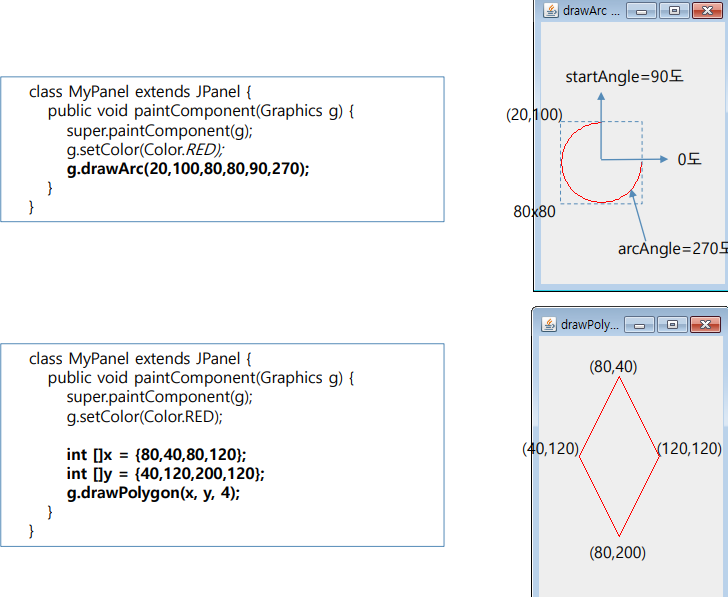
이들 메서드를 이용하여 원호와 페러다임을 그리는 예는 다음과 같습니다.
도형 칠하기
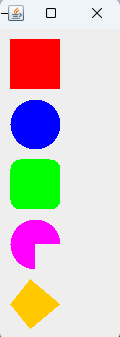
도형 칠하기란 도형의 외곽선과 내부를 동일한 색으로 칠하는 기능입니다. 도형의 외곽선과 내부를 분리하여 칠하는 기능은 없습니다. 내부 색과 외곽선 색을 달리하고자 하면, 도형 내부를 칠한 후, 다른 색으로 외곽선을 그려야 합니다. 도형 칠하기를 위한 메소드는 다음과 같이 그리기 메서드 명에서 draw를 fill로 바꾸면 됩니다.
drawRect() -> fillReact()
drawArc() -> fillArc()
import javax.swing.*;
import java.awt.*;

public class GraphicsFillEx extends JFrame {
    private MyPanel panel = new MyPanel();

    public GraphicsFillEx() {
     setTitle("fillXXX 사용 예제");
     setDefaultCloseOperation(JFrame.EXIT_ON_CLOSE);
     setContentPane(panel);

     setSize(100, 350);
     setVisible(true);
    }

    class MyPanel extends JPanel {
        public void paintComponent(Graphics g) {
            super.paintComponent(g);
            g.setColor(Color.RED);
            g.fillRect(10, 10, 50, 50); // 빨간색 사각형 칠하기
            g.setColor(Color.BLUE);
            g.fillOval(10, 70, 50, 50);
            g.setColor(Color.GREEN);
            g.fillRoundRect(10, 130, 50, 50, 20, 20); // 초록색 둥근사각형 칠하기
            g.setColor(Color.MAGENTA);
            g.fillArc(10, 190, 50, 50, 0, 270); // 마젠타색 원호 칠하기
            g.setColor(Color.ORANGE);
            int [] x = { 30, 10, 30, 60 };
            int [] y = { 250, 275, 300, 275 };
            g.fillPolygon(x, y, 4); // 오렌지색 다각형 칠하기
        }
    }

    public static void main(String[] args) {
        new GraphicsFillEx();
    }
}
[실행결과]
'프로그래밍 언어 > JAVA' 카테고리의 다른 글
| 클리핑(Clipping) (3) | 2025.07.30 |
|---|---|
| 이미지 그리기 (4) | 2025.07.27 |
| Graphics (2) | 2025.07.21 |
| 스윙 컴포넌트 그리기 (4) | 2025.07.18 |
| JSlider, 슬라이더 컴포넌트 (2) | 2025.07.15 |


