스레드 종료

스레드의 종료는 스스로 종료하는 경우와 다른 스레드에 의해 강제 종료되는 경우가 있습니다. 종료된 스레드를 다시 살릴 수도 없습니다.
스스로 종료
스레드는 다음 예와 같이 run() 메서드가 실행 도중 리턴하거나 run()을 완전히 실행하고 리턴하면 종료됩니다.
public void run() {
	................
	return; // 스레드는 스스로 종료한다.
	................
}
강제 종료
그러면 한 스레드가 다른 스레드를 강제로 종료시킬 수 있을까? 종료시키고자 하는 스레드의 interrupt() 메서드를 호출하면 됩니다.
main() 스레드는 TimerThread 스레드를 생성한 뒤, 강제로 종료시키기 위해 TimerThread의 interrupt()를 호출합니다. 이 결과 TimerThread 스레드에 InterruptedException 예외가 발생합니다.
이때 TimerThread는 InterruptedException 예외를 받게 되면 catch 루틴이 실행되어 return 하지 않으면 run() 메서드가 끝나지 않기 때문에, 다른 스레드에서 interrupt()를 호출하여도 TimerThread 스레드는 종료되지 않습니다.
정리하면, 스레드 A가 스레드 B를 강제 종료시키고자 하는 경우, 다음과 같이 스레드 B의 interrupt()를 호출하여야 한다.
B.interrupt(); // 스레드 B를 종료시킨다.
타이머 스레드 강제 종료
import javax.swing.*;
import java.awt.*;
import java.awt.event.ActionEvent;
import java.awt.event.ActionListener;

class TimerRuunable implements Runnable {
    private JLabel timerLabel; // 타이머 값이 출력된 레이블

    public TimerRuunable(JLabel timerLabel) {
        this.timerLabel = timerLabel;
    }

    // 스레드 코드. run()이 종료하면 스레드 종료
    @Override
    public void run() {
        int n = 0; // 타이머 카운트 값
        while (true) { // 무한 루프
            timerLabel.setText(Integer.toString(n)); // 타이머 값을 레이블에 출력
            n++; // 카운트 증가
            try {
                Thread.sleep(1500); // 1초동안 잠을 잔다.
            }
            catch (InterruptedException e) {
                return; // 예외가 발생하면 스레드 종료
            }
        }
    }
}

public class ThreadInterruptEx extends JFrame{
    private Thread th;
    public ThreadInterruptEx() {
        setTitle("ThreadInterruptEx 예제");
        setDefaultCloseOperation(JFrame.EXIT_ON_CLOSE);
        Container c = getContentPane();
        c.setLayout(new FlowLayout());

        // 타이머 값을 츨력할 레이블 생성
        JLabel timerLabel = new JLabel();
        timerLabel.setFont(new Font("Gothic", Font.ITALIC, 80));

        // 타이머 스레드로 사용할 Runnable 객체 생성
        // 타이머 값을 출력할 레이블 컴포넌트를 생성자에 전달한다.
        TimerRuunable runnable = new TimerRuunable(timerLabel);
        th = new Thread(runnable); // 스레드 생성
        c.add(timerLabel);

        // 버튼을 생성하고 Action 리스너 등록
        JButton btn = new JButton("kill Timer");
        btn.addActionListener(new ActionListener() {
            @Override
            public void actionPerformed(ActionEvent e) {
                th.interrupt(); // 타이머 스레드 강제 종료
                JButton btn = (JButton)e.getSource();
                btn.setEnabled(false); // 버튼 비활성화
            }
        });
        c.add(btn);

        setSize(300, 170);
        setVisible(true);

        th.start();
    }

    public static void main(String[] args) {
        new ThreadInterruptEx();
    }
}
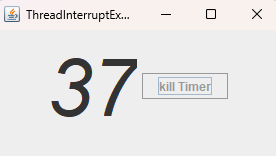
[실행결과]

flag를 이용한 종료
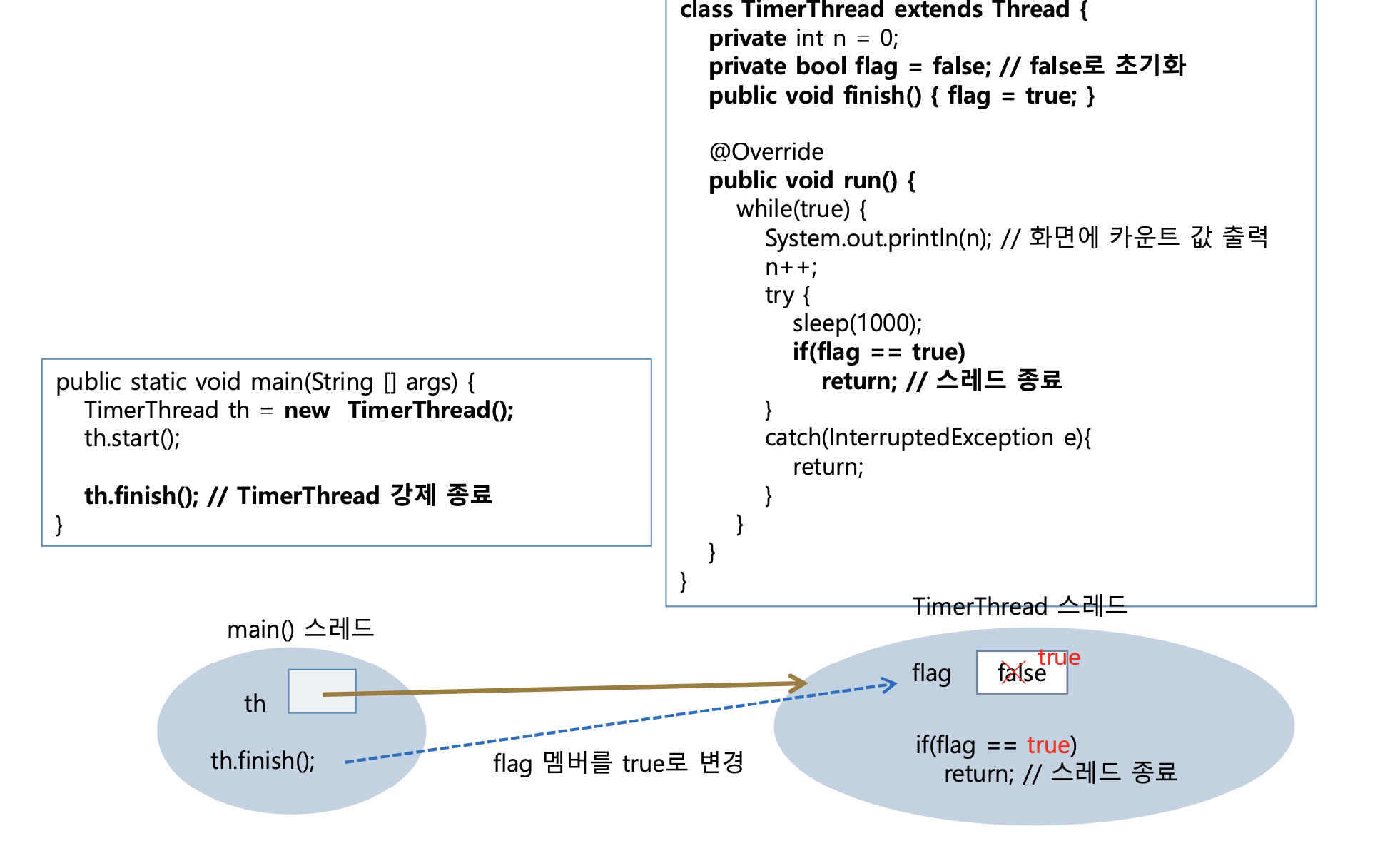
flag를 이용한 스레드 강제 종료
import javax.swing.*;
import java.awt.*;
import java.awt.event.MouseAdapter;
import java.awt.event.MouseEvent;

class RandomThread extends Thread {
    private Container contentPane;
    private boolean flag = false; // 스레드의 종료 명령을 표시하는 플래그. true : 종료 지시

    public RandomThread(Container contentPane) {
        this.contentPane = contentPane;
    }

    public void finsh() { // 스레드 종료 명령을 flag에 표시
        flag = true;
    }

    @Override
    public void run() {
        while (true) {
            int x = ((int) (Math.random()* contentPane.getWidth()));
            int y = ((int) (Math.random() * contentPane.getHeight()));
            JLabel label = new JLabel("java"); // 새 레이블 생성
            label.setSize(80, 30); // 레이블 크기 80x30
            label.setLocation(x, y); // 레이블을 컨탠트팬 내의 임의의 위치로 설정
            contentPane.add(label); // 레이블을 컨텐트 팬에 추기
            contentPane.repaint(); // 컨탠트팬을 다시 그려 추가된 레이블이 보이게 함
            try {
                Thread.sleep(300); // 0.3초 동안 잠을 잔다.
                if (flag == true) {
                    contentPane.removeAll(); // 컨탠트팬에 있는 모든 레이블 제거
                    label = new JLabel("finish");
                    label.setSize(80, 30); // "Java" 레이블의 크기 80x30
                    label.setLocation(100, 100); // 레이블을 컨탠트팬 내의 임의의 위치로 설정
                    label.setForeground(Color.RED);
                    contentPane.add(label); // "finish" 레이블 달기
                    contentPane.repaint(); // 컨탠트팬을 다시 그의 추가된 레이블이 보이게 함.
                    return; // 스레드 종료
                }
            } catch (InterruptedException e) {
                return;
            }
        }
    }
}

public class ThreadFinishFlagEx extends JFrame {
    private RandomThread th; // 스레드 래퍼런스

    public ThreadFinishFlagEx() {
        setTitle("ThreadFinishFlagEx 예제");
        setDefaultCloseOperation(JFrame.EXIT_ON_CLOSE);
        Container c = getContentPane();
        c.setLayout(null);

        c.addMouseListener(new MouseAdapter() {
            @Override
            public void mousePressed(MouseEvent e) {
                th.finsh(); // RandomThread 스레드 종료 명령
            }
        });
        setSize(300, 200);
        setVisible(true);

        th = new RandomThread(c); // 스레드 생성, 스레드에 컨탠트팬 전달
        th.start();
    }

    public static void main(String[] args) {
        new ThreadFinishFlagEx();
    }
}
[실행 결과]
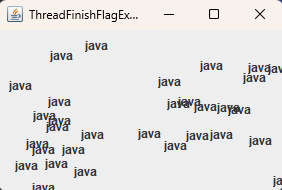
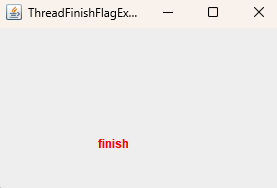
'프로그래밍 언어 > JAVA' 카테고리의 다른 글
| wait(), notify(), notifyAll()을 이용한 스레드 동기화 (4) | 2025.08.25 |
|---|---|
| 스레드 동기화(Thread Synchronization) (3) | 2025.08.22 |
| 스레드 생명 주기와 스케줄링 (4) | 2025.08.16 |
| Runnable 인터페이스 스레드 만들기 (4) | 2025.08.13 |
| Thread 클래스를 상속받아 스레드 만들기 (1) | 2025.08.10 |


