XML 데이터 연동하기
이번에는 Ajax 응답 시 도서 정보를 XML로 전달받아 출력하는 예제를 실습해 보겠습니다.
1. 다음과 같이 AjaxTest2 클래스를 작성합니다. <title>, <writer>, <image> 태그를 이용해 도시 정보를 XML 형식으로 작성한 후 브라우저로 전송합니다.
package sec01.ex01;

import java.io.IOException;
import java.io.PrintWriter;

import javax.servlet.ServletException;
import javax.servlet.annotation.WebServlet;
import javax.servlet.http.HttpServletRequest;
import javax.servlet.http.HttpServletResponse;

@WebServlet("/ajaxTest2")
public class AjaxTest2 {
	private static final long serialVersionUID = 1L;

	/**
	 * @see HttpServlet#doGet(HttpServletRequest request, HttpServletResponse
	 *      response)
	 */
	protected void doGet(HttpServletRequest request, HttpServletResponse response) throws ServletException, IOException {
		doHandle(request, response);
	}

	/**
	 * @see HttpServlet#doPost(HttpServletRequest request, HttpServletResponse
	 *      response)
	 */
	protected void doPost(HttpServletRequest request, HttpServletResponse response)	throws ServletException, IOException {
		doHandle(request, response);
	}


	private void doHandle(HttpServletRequest request, HttpServletResponse response) throws ServletException, IOException {
		request.setCharacterEncoding("utf-8");
		response.setContentType("text/html; charset=utf-8");
		String result = "";
		PrintWriter writer = response.getWriter();
		result="<main><book>"+
		         "<title><![CDATA[초보자를 위한 자바 프로그래밍]]></title>" +
		         "<writer><![CDATA[인포북스 저 | 이병승]]></writer>" +
		         "<image><![CDATA[http://localhost:8080/pro16/image/image1.jpg]]></image>"+
		      "</book>"+
		      "<book>"+
		         "<title><![CDATA[모두의 파이썬]]></title>" +
		         "<writer><![CDATA[길벗 저 | 이승찬]]></writer>" +
		        "<image><![CDATA[http://localhost:8080/pro16/image/image2.jpg]]></image>"+
		      "</book></main>";
		System.out.println(result);
		writer.print(result);
	}
}
2. 브라우저에서는 XML 데이터를 받은 후 제이쿼리의 find() 메서드에 <title>, <writer>, <image> 태그 이름으로 호출하여 각각의 도서 정보를 가져옵니다.
<!DOCTYPE html>
<html>
<head>
<meta charset="UTF-8">
   <title>도서 정보 출력창</title>
   <script  src="http://code.jquery.com/jquery-latest.min.js"></script>
   <script type="text/javascript">
      function fn_process(){
        $.ajax({
            type:"post",
            async:false,
            url:"http://localhost:8080/pro16/ajaxTest2",
            dataType:"xml",
            success:function (info,textStatus){
              $(info).find("book").each(function(){
	              var title=$(this).find("title").text();
	              var writer=$(this).find("writer").text();
	              var image=$(this).find("image").text();
	              $("#bookInfo").append(
	                  	"<p>" +title+ "</p>" +
		                "<p>" +writer + "</p>"+
	 	                "<img src="+image + "   />"
	              );
              });
            },
            error:function(data,textStatus){
               alert("에러가 발생했습니다.");ㅣ
            },
            complete:function(data,textStatus){
               //alert("작업을완료 했습니다");
            }
       });
     }
  </script>
</head>
<body>
	<div id="bookInfo"></div>
	<input type=button value="도서정보 요청"  onclick="fn_process()">
</body>
</html>
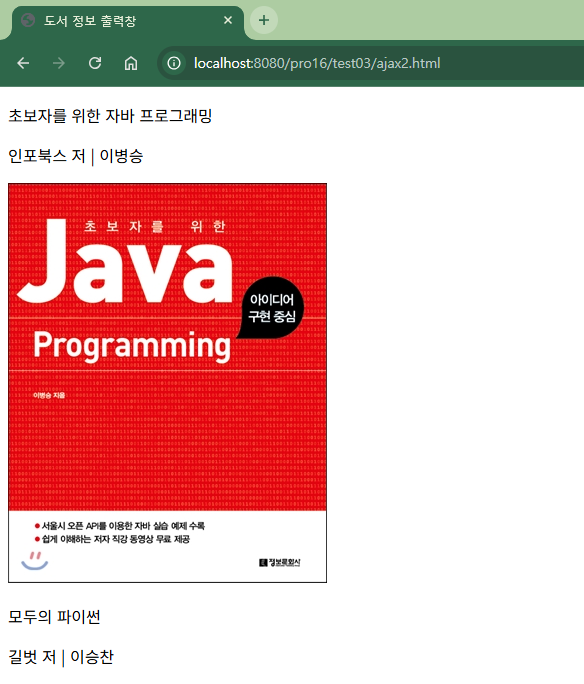
3. http://localhost:8080/pro16/test03/ajax.html로 요청하여 도서정보 요청을 클릭하면 도서 정보의 이미지가 나타납니다.
'프로그래밍 언어 > 자바 웹' 카테고리의 다른 글
| 제이쿼리에서 JSON 사용하기 (0) | 2026.05.27 |
|---|---|
| ID 중복 여부 확인하기 (0) | 2026.05.24 |
| 제이쿼라 Ajax 사용하기 (0) | 2026.05.18 |
| 제이쿼리 Ajax 사용법 (0) | 2026.05.15 |
| 제이쿼리 Ajax 기능 (0) | 2026.05.12 |