여러 개의 값을 전송할 때의 요청 처리
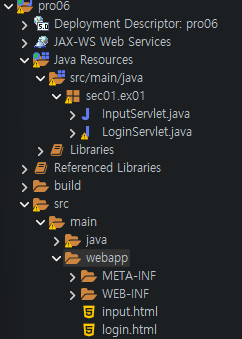
1. 다음과 같이 input.html을 추가하고 InputServlet 클래스를 새로 만듭니다.
2. input.html을 다음과 같이 작성합니다. <input> 타입이 여러 개일 때는 체크박스(Checkbox)를 사용해서 값을 설정하는 것이 좋습니다. 체크박스의 name 속성 값은 모두 subject이므로 서블릿으로 전송할 때 배열로 전송됩니다.
<!DOCTYPE html>
<html>
<head>
<meta charset="UTF-8">
<title>여러 가지 input 타입 표시창</title>
</head>
<body>
<form name="frmInput" method="get" action="input">
   아이디  :<input type="text" name="user_id"><br>
   비밀번호:<input type="password" name="user_pw"><br>
   <input type="checkbox" name="subject" value="java" checked >자바
   <input type="checkbox" name="subject" value="C언어">C언어
   <input type="checkbox" name="subject" value="JSP">JSP
   <input type="checkbox" name="subject" value="안드로이드">안드로이드
   <br><br>
   <input type="submit" value="전송">
   <input type="reset" value="초기화">
  </form>
</body>
</html>
3. InputServlet 클래스를 다음과 같이 작성합니다. getParameterValues()를 이용해 input.html에서 체크박스의 name인 subject로 전송된 값들을 받아 외서 문자열 배열에 지정합니다.
package sec01.ex01;

import jakarta.servlet.ServletException;
import jakarta.servlet.annotation.WebServlet;
import jakarta.servlet.http.HttpServlet;
import jakarta.servlet.http.HttpServletRequest;
import jakarta.servlet.http.HttpServletResponse;
import java.io.IOException;

@WebServlet("/input")
public class InputServlet extends HttpServlet {
	private static final long serialVersionUID = 1L;

	public void init() throws ServletException {
		System.out.println("init 메소드 호출");
	}

	protected void doGet(HttpServletRequest request, HttpServletResponse response) throws ServletException, IOException {
		request.setCharacterEncoding("utf-8");
		String user_id = request.getParameter("user_id");
		String user_pw = request.getParameter("user_pw");
		System.out.println("아이디:" + user_id);
		System.out.println("비밀번호:" + user_pw);
		String[] subject = request.getParameterValues("subject");
		for (String str : subject)
		{
			System.out.println("선택한 과목:" + str);
		}
	}

	public void destory()
	{
		System.out.println("destroy 메소드 호출");
	}
}
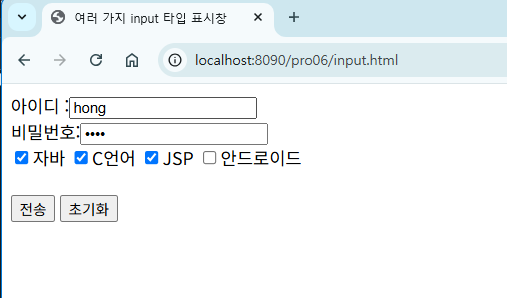
4. 브라우저에서 http://localhost:8090/pro06/input.html로 요청합니다.

5. 체크박스에서 여러 개의 값에 체크한 후 전송을 클릭하면 이클립스 콘솔에 해당 과목명이 출려됩니다.

'프로그래밍 언어 > 자바 웹' 카테고리의 다른 글
| 서블릿의 응답 처리 방법 & MIME-TYPE (1) | 2025.04.30 |
|---|---|
| getParameterNames() 메서드를 이용한 요청 관리 (1) | 2025.04.27 |
| HttpServletRequest로 요청 처리 실습 (1) | 2025.04.21 |
| <form> 태그 이용해 서블릿에 요청하기 (1) | 2025.04.18 |
| 서블릿 응답과 요청 수행 API 기능 (0) | 2025.04.15 |


