요청과 응답 이해하기
서버는 클라이언트가 있기에 동작합니다. 클라이언트에서 서버로 요청(request)을 보내고, 서버에서는 요청의 내용을 읽고 처리한 뒤 클라이언트에 응답(response)을 보냅니다.
따라서 서버에는 요청을 받는 부분돠 응답을 보내는 부분이 있어야 합니다. 요청과 응답은 이벤트 방식이라고 생각하면 됩니다. 클라이언트로부터 요청이 왔을 때 어떤 작업을 수행할지 이벤트 리스너를 미리 등록되어야 합니다.
createServer.js
const http = require("http");

http.createServer((req, res) => {
  // 여기에 어떻게 응답할지 적습니다.
});
http 서버가 있어야 웹 브라우저의 요청을 처리할 수 있으므로 http 모듈을 사용했습니다. http 모듈에는 createServer 메서드가 있습니다. 인수로 요청에 대한 콜백 함수를 넣을 수 있으며, 요청이 들어올 때마다 매번 콜백 함수가 실행됩니다. 따라서 이 콜백 함수에 응답을 적으면 됩니다.
createServer의 콜백 부분을 보면 req와 res 매개변수가 있습니다. 보통 request를 줄여 req라고 표현하고, response를 줄여 res라고 표현합니다. req 객체는 요청에 관한 정보들을, res 객체는 응답에 관한 정보들을 담고 있습니다.
server1.js
const http = require("http");

http
  .createServer((req, res) => {
    res.writeHead(200, { "Content-Type": "text/html; charset=utf-8" });
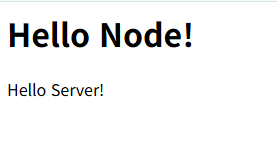
    res.write("<h1>Hello Node!</h1>");
    res.end("<p>Hello Server!</p>");
  })
  .listen(8080, () => {
    // 서버 연결
    console.log("8080번 포트에서 서버 대기 중입니다!");
  });
콘솔
$ node server1
8080번 포트에서 서버 대기 중입니다!
이제 웹 브라우저를 열어 http://localhost:8080 또는 http://127.0.0.1:8080에 접속합니다.
listen 메서드에 콜백 함수를 넣는 대신, 다음과 같이 서버에 listening 이벤트 리스너를 붙여도 됩니다. 추가로 error 이벤트 리스너도 붙여봤습니다.
server1-1.js
const http = require("http");

const server = http.createServer((req, res) => {
  res.writeHead(200, { "Content-Type": "text/html; charset=utf-8" });
  res.write("<h1>Hello Node!</h1>");
  res.end("<p>Hello Server!</p>");
});
server.listen(8080);

server.on("listening", () => {
  console.log("8080번 포트에서 서버 대기 중입니다!");
});
server.on("error", (error) => {
  console.error(error);
});
한 번에 여러 서버를 실행할 수도 있습니다. createServer를 원하는 만큼 호출하면 됩니다.
server1-2.js
const http = require("http");

http
  .createServer((req, res) => {
    res.writeHead(200, { "Content-Type": "text/html; charset=utf-8" });
    res.write("<h1>Hello Node!</h1>");
    res.end("<p>Hello Server!</p>");
  })
  .listen(8080, () => {
    // 서버 연결
    console.log("8080번 포트에서 서버 대기 중입니다!");
  });
http
  .createServer((req, res) => {
    res.writeHead(200, { "Content-Type": "text/html; charset=utf-8" });
    res.write("<h1>Hello Node!</h1>");
    res.end("<p>Hello Server!</p>");
  })
  .listen(8081, () => {
    // 서버 연결
    console.log("8081번 포트에서 서버 대기 중입니다!");
  });
각각 localhost:8080과 localhost:8081 주소로 서버에 접속할 수 있습니다. 이때 포트 번호가 달라야 한다는 점에 주의하세요. 포트 번호가 같으면 EADDRINUSE 에러가 발생합니다. 단, 실무에서는 이런 식으로 서버를 여러 개 띄우는 일은 드뭅니다.
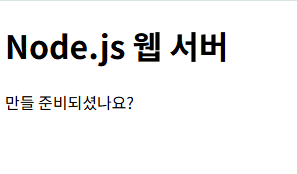
res.write와 res.end에 일일이 HTML을 적는 것은 비효율적이므로 미리 HTML 파일을 만들어두면 좋을것 같습니다. 그 HTML 파일을 fs 모듈로 읽어서 전송할 수 있습니다.
server2.html
<!DOCTYPE html>
<html lang="en">
  <head>
    <meta charset="UTF-8" />
    <title>Node.js 웹 서버</title>
  </head>
  <body>
    <h1>Node.js 웹 서버</h1>
    <p>만들 준비되셨나요?</p>
  </body>
</html>
server2.js
const http = require("http");
const fs = require("fs").promises;

http
  .createServer(async (req, res) => {
    try {
      const data = await fs.readFile("./server2.html");
      res.writeHead(200, { "Content-Type": "text/html; charset=utf-8" });
      res.end(data);
    } catch (err) {
      res.writeHead(500, { "Content-Type": "text/plain; charset=utf-8" });
      res.end(err.message);
    }
  })
  .listen(8081, () => {
    console.log("8081번 포트에서 서버 대기 중입니다!");
  });
요청이 들어오면 먼저 fs 모듈로 HTML 파일을 읽습니다. data 변수에 저장된 버퍼를 그대로 클라이언트에 보내면 됩니다.
콘솔
$ node server2
8081번 포트에서 서버 대기 중입니다!
'프로그래밍 언어 > NODE JS' 카테고리의 다른 글
| 쿠키와 세션 이해하기 (1) | 2025.05.23 |
|---|---|
| REST와 라우팅 사용하기 (0) | 2025.05.19 |
| 자주 발생하는 에러들 (0) | 2025.05.13 |
| 예외 처리하기 (0) | 2025.05.10 |
| 이벤트 이해하기 (0) | 2025.05.07 |

