구구단 출력 예제
1. 구구단 예제 실습 파일인 gugu.html, gugu.jsp, gugu2.jsp를 준비합니다.
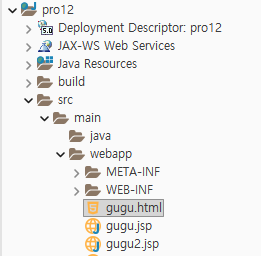
2. gugu.html을 다음과 같이 작성합니다. 출력할 구구단의 단수를 입력받아 gugu.jsp로 포워딩합니다.
<!DOCTYPE html>
<html>
<head>
<meta charset="UTF-8">
<title>Insert title here</title>
</head>
<body>
	<h1> 구구단의 단수를 입력하세요.</h1>
	<form method=get action="gugu.jsp">
		출력할 구구단: <input type='text' name='dan' /><br>
		<input type='submit' value='출력하기'>
	</form>
</body>
</html>
3. gugu.jsp를 다음과 같이 작성합니다. 스크립트릿 안에서 자바 for문을 이용해 <table> 태그의 행을 나타내는 <tr> 태그를 연속해서 브라우저로 출력합니다.
<%@ page language="java" contentType="text/html; charset=UTF-8"
    pageEncoding="UTF-8"%>
<%
	request.setCharacterEncoding("utf-8");
	int dan = Integer.parseInt(request.getParameter("dan"));
%>
<!DOCTYPE html>
<html>
<head>
<meta charset="UTF-8">
<title>단수 입력창</title>
</head>
<body>
	<table border="1" width='800'>
		<tr align='center' bgColor='#FFFF66'>
			<td colspan='2'><%= dan %>단 출력</td>
		</tr>
		<%
			for (int i = 1; i < 10; i++) {
		%>
		<tr align='center'>
			<td width='400'>
				<%=dan %> * <%=i %>
			</td>
			<td width='400'>
				<%=i*dan %>
			</td>
		</tr>
		<%
			}
		%>
	</table>
</body>
</html>
4. http://localhost:8090/pro12/gugu.html로 요청하여 입력창에서 단수를 입력한 후 전송합니다.

5. for문을 이용해 구구단을 리스트로 출력합니다.

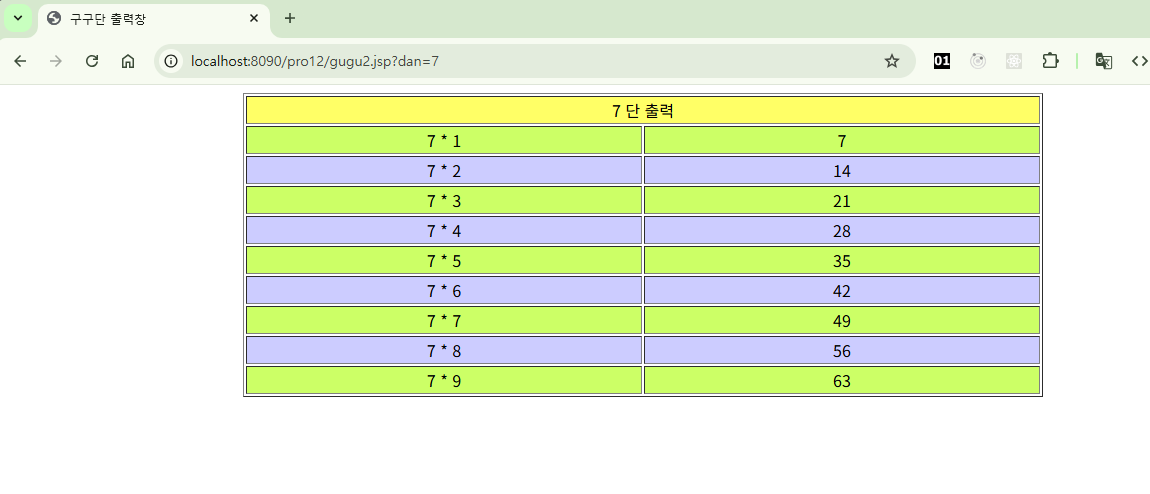
6. 다음과 같이 gugu2.jsp를 작성합니다. if 문에서 for 반복문의 반복 변수 i를 사용해 홀수인지 짝수인지 체크합니다. 그런 다음 <tr> 태그의 bgcolor 속성 값을 다르게 설정하여 브라우저로 출력합니다.
<%@ page language="java" contentType="text/html; charset=UTF-8"
    pageEncoding="UTF-8"%>
<%
  request.setCharacterEncoding("utf-8");
  int dan=Integer.parseInt(request.getParameter("dan"));
%>

<!DOCTYPE html>
<html>
<head>
<meta charset="UTF-8">
<title>구구단 출력창</title>
</head>
<body>
   <table border=1 width=800 align=center>
     <tr align=center bgcolor="#FFFF66">
         <td colspan=2><%= dan %> 단 출력  </td>
     </tr>

	<%
	  for(int i=1; i<10;i++){
	%>
	   <%
	      if(i%2==1){
	   %>
	     <tr align=center bgcolor="#CCFF66">
	   <%
	      }else{
	   %>
	      <tr align=center bgcolor="#CCCCFF">
	   <%
	      }
	   %>
        <td width=400>
           <%=dan %> * <%=i %>
	  	</td>
	  	<td width=400>
	  	    <%=i*dan %>
	  	</td>
	    </tr>
	<%
	  }
	%>
</table>
</body>
</html>
7. 브라우저에서 실행하면 홀수 행과 짝수 행의 배경색이 다르게 출력됩니다.
'프로그래밍 언어 > 자바 웹' 카테고리의 다른 글
| 내장 객체(내장 변수) 기능 (0) | 2025.10.19 |
|---|---|
| 이미지 리스트 출력 예제 (0) | 2025.10.16 |
| 학점 변환 예제 (0) | 2025.10.10 |
| 스크립트 요소 이용해 실습하기 - 로그인 예제 (0) | 2025.10.07 |
| JSP 주석문 사용하기 (0) | 2025.10.04 |