JSP welcome 파일 지정하기
지금까지 JSP나 서블릿을 일일이 브라우저에서 요청하여 화면을 표시했습니다. 그런데 웹 애플리케이션 첫 화면에 해당하는 홈페이지를 다음과 같이 web.xml에 등록해 두면 브라우저에서는 컨텍스트 이름만으로 요청하여 간단하게 표시할 수 있습니다.
web.xml
<welcome-file-text>
	<welcome-file>jsp 또는 html 파일 이름1</welcome-file>
	<welcome-file>jsp 또는 html 파일 이름2</welcome-file>
	...
</welcome-file-text>
홈페이지로 사용되는 welcome 페이지는 JSP나 HTML 파일이 될 수도 있고 여러 개를 등록해서 사용할 수도 있겠죠. 그러면 요청 시 첫 번째로 지정한 welcome 파일로 차례로 찾아 홈페이지로 보여줍니다. 직접 web.xml에 설정해서 요청해 보겠습니다.
1. 다음과 같이 test02 폴더 하위에 main.jsp 파일과 web.xml 파일을 준비합니다.
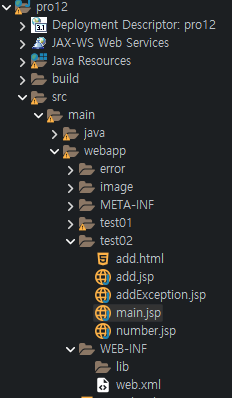
2. web.xml에 <welcome-file-list> 태그 경로를 포함하여 홈페이지에 해당하는 파일들을 나열합니다.
<?xml version="1.0" encoding="UTF-8"?>
<web-app xmlns:xsi="http://www.w3.org/2001/XMLSchema-instance" xmlns="http://xmlns.jcp.org/xml/ns/javaee" xsi:schemaLocation="http://xmlns.jcp.org/xml/ns/javaee http://xmlns.jcp.org/xml/ns/javaee/web-app_3_1.xsd" id="WebApp_ID" version="3.1">
	<welcome-file-list>
		<welcome-file>/test02/main.jsp</welcome-file>
		<welcome-file>/test02/add.jsp</welcome-file>
		<welcome-file>/test02/add.html</welcome-file>
	</welcome-file-list>
</web-app>
3. 첫 번째 홈페이지인 main.jsp 페이지를 다음과 같이 작성합니다.
<%@ page language="java" contentType="text/html; charset=UTF-8"
    pageEncoding="UTF-8"%>
<!DOCTYPE html>
<html>
<head>
	<meta charset="UTF-8">
	<title>홈페이지</title>
</head>
<body>
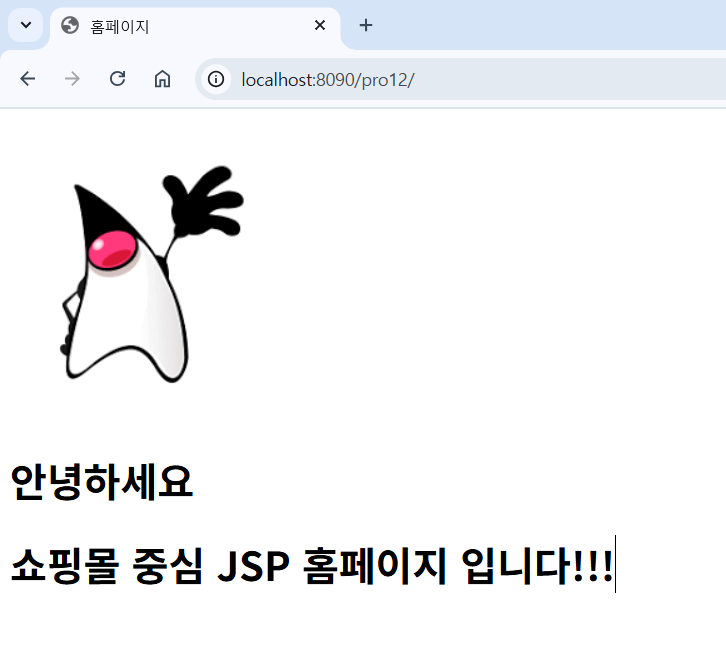
	<img src="./image/duke.png" /><br>
	<h1>안녕하세요</h1>
	<h1>쇼핑몰 중심 JSP 홈페이지 입니다!!!</h1>
</body>
</html>
4. 톰캣을 다시 실행한 후 브라우저에서 컨텍스트 이름(/pro12)으로 요청합니다.
'프로그래밍 언어 > 자바 웹' 카테고리의 다른 글
| 인클루드 액션 태그 사용하기 (0) | 2025.11.18 |
|---|---|
| 스크립트 요소 이용해 회원 정보 조회하기 (0) | 2025.11.15 |
| 에러 코드에 따른 예외 페이지 지정 (0) | 2025.11.09 |
| JSP 페이지 예외 처리 실습 (0) | 2025.11.06 |
| JSP 페이지 예외 처리 과정 (0) | 2025.11.03 |