Nodebird 서비스와 데이터베이스를 공유하는 프로젝트 구조 갖추기(2)
이제 새로 생성한 도메인 모델을 시퀄라이즈와 연결합니다. 사용자 모델과 일대다 관계를 가지는데, 사용자 한 명이 여러 도메인을 소유할 수고 있기 때문입니다.
models/index.js
const Sequelize = require("sequelize");
const env = process.env.NODE_ENV || "development";
const config = require("../config/config")[env];
const User = require("./user");
const Post = require("./post");
const Hashtag = require("./hashtag");
const Domain = require("./domain");

const db = {};
const sequelize = new Sequelize(
  config.database,
  config.username,
  config.password,
  config
);

db.sequelize = sequelize;
db.User = User;
db.Post = Post;
db.Hashtag = Hashtag;
db.Domain = Domain;

User.init(sequelize);
Post.init(sequelize);
Hashtag.init(sequelize);
Domain.init(sequelize);

User.associate(db);
Post.associate(db);
Hashtag.associate(db);
Domain.associate(db);

module.exports = db;
nodebird-api/models/user.js
const Sequelize = require("sequelize");

module.exports = class User extends Sequelize.Model {
  static init(sequelize) {
    return super.init(
      {
        email: {
          type: Sequelize.STRING(40),
          allowNull: true,
          unique: true,
        },
        nick: {
          type: Sequelize.STRING(15),
          allowNull: false,
        },
        password: {
          type: Sequelize.STRING(100),
          allowNull: true,
        },
        provider: {
          type: Sequelize.STRING(10),
          allowNull: false,
          defaultValue: "local",
        },
        snsId: {
          type: Sequelize.STRING(30),
          allowNull: true,
        },
      },
      {
        sequelize,
        timestamps: true,
        underscored: false,
        modelName: "User",
        tableName: "users",
        paranoid: true,
        charset: "utf8",
        collate: "utf8_general_ci",
      }
    );
  }

  static associate(db) {
    db.User.hasMany(db.Post);
    db.User.belongsToMany(db.User, {
      foreignKey: "followingId",
      as: "Followers",
      through: "Follow",
    });
    db.User.belongsToMany(db.User, {
      foreignKey: "followerId",
      as: "Followings",
      through: "Follow",
    });
    db.User.hasMany(db.Domain);
  }
};
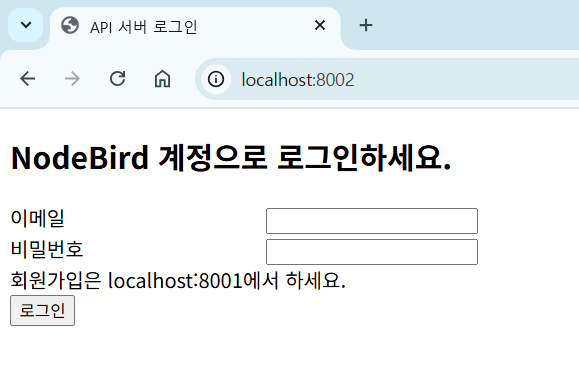
다음은 로그인하는 화면입니다. 카카오 로그인은 제외했습니다. 카카오 로그인을 추가하려면 카카오 개발자 사이트에서 http://localhost:8002 도메인을 추가로 등록해야 합니다.
nodebird-api/views/login.html
<!DOCTYPE html>
<html lang="en">
  <head>
    <meta charset="UTF-8" />
    <title>API 서버 로그인</title>
    <style>
      .input-group label {
        width: 200px;
        display: inline-block;
      }
    </style>
  </head>
  <body>
    {% if user and user.id %}
    <span class="user-name">안녕하세요! {{user.nick}}님</span>
    <a href="/auth/logout">
      <button>로그아웃</button>
    </a>
    <fieldset>
      <legend>도메인 등록</legend>
      <form action="/domain" method="post">
        <div>
          <label for="type-free">무료</label>
          <input type="radio" id="type-free" value="free" />
          <label for="type-premium">프리미엄</label>
          <input type="radio" id="type-premium" name="type" value="premium" />
        </div>
        <div>
          <label for="host">도메인</label>
          <input
            type="text"
            id="host"
            name="host"
            placeholder="ex) zerocho.com"
          />
        </div>
        <button>저장</button>
      </form>
    </fieldset>
    <table>
      <tr>
        <th>도메인 주소</th>
        <th>타입</th>
        <th>클라이언트 비밀키</th>
      </tr>
      {% for domain in domains %}
      <tr>
        <td>{{domain.host}}</td>
        <td>{{domain.type}}</td>
        <td>{{domain.clientSecret}}</td>
      </tr>
      {% endfor %}
    </table>
    {% else %}
    <form action="/auth/login" id="login-form" method="post">
      <h2>NodeBird 계정으로 로그인하세요.</h2>
      <div class="input-group">
        <label for="email">이메일</label>
        <input id="email" type="email" name="email" required autofocus />
      </div>
      <div class="input-group">
        <label for="password">비밀번호</label>
        <input id="password" type="password" name="password" required />
      </div>
      <div>회원가입은 localhost:8001에서 하세요.</div>
      <button id="login" type="submit">로그인</button>
    </form>
    <script>
      window.onload = () => {
        if (new URL(location.href).searchParams.get("loginError")) {
          alert(new URL(location.href).searchParams.get("loginError"));
        }
      };
    </script>
    {% endif %}
  </body>
</html>
위 코드에는 도메인을 등록하는 화면도 포함되어 있습니다. 로그인하지 않았다면 로그인 창이 먼저 뜨고, 로그인한 사용자에게는 도메인 등록 화면을 보여줍니다.
nodebird-api/routes/index.js
const express = require("express");
const { id: uuidv4 } = require("uuid");
const { User, Domain } = require("../models");
const { isLoggedIn } = require("./middlewares");

const router = express.Router();

router.get("/", async (req, res, next) => {
  try {
    const user = await User.findOne({
      where: { id: (req.user && req.user.id) || null },
      include: { model: Domain },
    });
    res.render("login", {
      user,
      domains: user && user.Domains,
    });
  } catch (err) {
    console.error(err);
    next(err);
  }
});

router.post("/domain", isLoggedIn, async (req, res, next) => {
  try {
    await Domain.create({
      UserId: req.user.id,
      host: req.body.host,
      type: req.body.type,
      clientSecret: uuidv4(),
    });
    res.redirect("/");
  } catch (err) {
    console.error(err);
    next(err);
  }
});

module.exports = router;
'프로그래밍 언어 > NODE JS' 카테고리의 다른 글
| JWT 토큰으로 인증하기 (0) | 2025.11.25 |
|---|---|
| JWT 토큰으로 인증하기 (1) (0) | 2025.11.22 |
| Nodebird 서비스와 데이터베이스를 공유하는 프로젝트 구조 갖추기(1) (0) | 2025.11.13 |
| API 서버 이해하기 (0) | 2025.11.10 |
| 프로젝트 마무리하기 (0) | 2025.11.07 |