클래스형 컴포넌트
constructor() 함수 알아보기
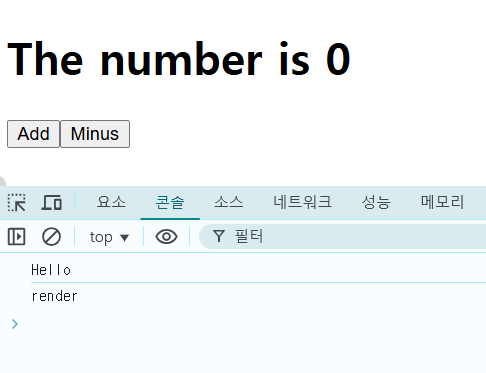
파일을 열고 constructor() 함수를 컴포넌트 안에 작성하고 console.log()로 아무 문장이나 출력합니다.
그리고 render() 함수에도 console.log()로 아무 문장이나 출력해봅시다.
import React from "react";

class App extends React.Component {
  constructor(props) {
    super(props);
    console.log("Hello");
  }
  state = {
    count: 0,
  };

  add = () => {
    this.setState((current) => ({
      count: current.count + 1,
    }));
  };

  minus = () => {
    this.setState((current) => ({ count: current.count - 1 }));
  };
  render() {
    return (
      <div>
        <h1>The number is {this.state.count}</h1>
        <button onClick={this.add}>Add</button>
        <button onClick={this.minus}>Minus</button>
      </div>
    );
  }
}

export default App;
[Console] 탭의 결과를 보면 constructor() 함수에 있는 console.log() 함수가 먼저 실행됩니다.
render() 함수보다 constructor() 함수가 먼저 실행됩니다.
componentDidMount() 함수 알아보기
componentDidMount() 함수는 컴포넌트가 처음 화면에 그려지면 실행되는 함수입니다.
import React from "react";

class App extends React.Component {
  constructor(props) {
    super(props);
    console.log("Hello");
  }
  state = {
    count: 0,
  };

  add = () => {
    this.setState((current) => ({
      count: current.count + 1,
    }));
  };

  minus = () => {
    this.setState((current) => ({ count: current.count - 1 }));
  };

  componentDidMount() {
    console.log("component rendered");
  }

  render() {
    console.log("I'm rendering");
    return (
      <div>
        <h1>The number is {this.state.count}</h1>
        <button onClick={this.add}>Add</button>
        <button onClick={this.minus}>Minus</button>
      </div>
    );
  }
}

export default App;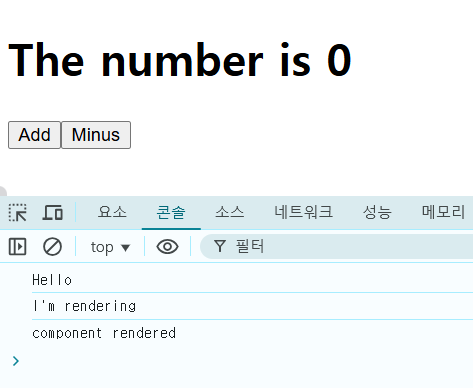
[Console] 탭을 보면 render() 함수가 실행된 다음 componentDidMount() 함수가 실행된 것을 알 수 있습니다.

componentDidUpdate() 함수 알아보기
import React from "react";

class App extends React.Component {
  constructor(props) {
    super(props);
    console.log("Hello");
  }
  state = {
    count: 0,
  };

  add = () => {
    this.setState((current) => ({
      count: current.count + 1,
    }));
  };

  minus = () => {
    this.setState((current) => ({ count: current.count - 1 }));
  };

  componentDidMount() {
    console.log("component rendered");
  }

  componentDidUpdate() {
    console.log("I just updated");
  }

  render() {
    console.log("I'm rendering");
    return (
      <div>
        <h1>The number is {this.state.count}</h1>
        <button onClick={this.add}>Add</button>
        <button onClick={this.minus}>Minus</button>
      </div>
    );
  }
}

export default App;
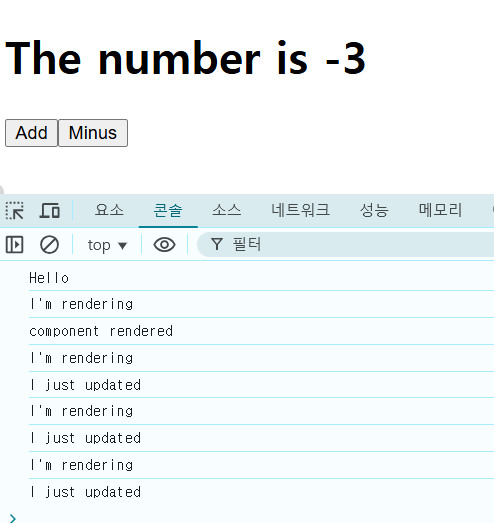
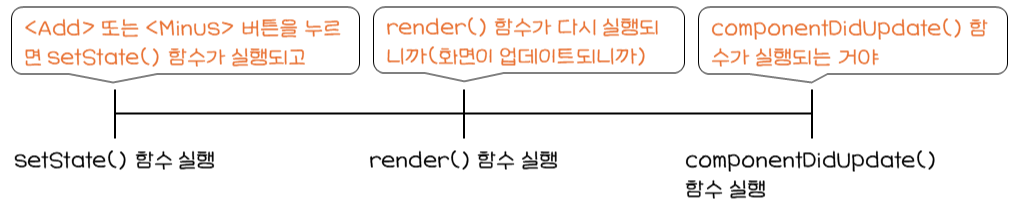
componentDidUpdate() 함수는 화면이 업데이트되면(새로 그려지면) 실행됩니다.
<Add> 또는 <Minus> 버튼을 누르면 I'm rendering과 I just updated라는 문장이 [Console] 탭에 출력됩니다.
리액트에서는 컴포넌트가 죽을 때 언마운트(Unmount)라고 분류합니다.
언마운트로 분류한 생명주기에서 꼭 알아야 할 함수는 componentWillUnmount()입니다.
componentWillUnmount() 함수 알아보기
import React from "react";

class App extends React.Component {
  constructor(props) {
    super(props);
    console.log("Hello");
  }
  state = {
    count: 0,
  };

  add = () => {
    this.setState((current) => ({
      count: current.count + 1,
    }));
  };

  minus = () => {
    this.setState((current) => ({ count: current.count - 1 }));
  };

  componentDidMount() {
    console.log("component rendered");
  }

  componentDidUpdate() {
    console.log("I just updated");
  }

  componentWillUnmount() {
    console.log("Goodbye, cruel world");
  }

  render() {
    console.log("I'm rendering");
    return (
      <div>
        <h1>The number is {this.state.count}</h1>
        <button onClick={this.add}>Add</button>
        <button onClick={this.minus}>Minus</button>
      </div>
    );
  }
}

export default App;
componentWillUnmount() 함수는 컴포넌트가 화면에서 떠날 때 실행됩니다.
'프로그래밍 언어 > REACT' 카테고리의 다른 글
| 영화 API 사용해 보기 (1) | 2025.02.04 |
|---|---|
| 영화 앱 만들기 워밍업 (0) | 2025.02.03 |
| 숫자 증감 기능을 제대로 만들어 보기 (0) | 2025.02.01 |
| state로 숫자 증감 기능 만들어보기 (0) | 2025.01.31 |
| prop-types 추가하기 (0) | 2025.01.30 |


