JSP 페이지에 다국어 표시하기
1. 먼저 프로젝트의 WebContent 폴더에 test05 폴더를 만든 후 message1.jsp 파일을 저장합니다.

2. message1.jsp 파일을 다음과 같이 작성합니다. <fmt:setLocale> 태그를 이용해 표시할 locale(언어)을 지정한 후 <fmt:bundle> 태그를 이용해 resource 패키지의 프로퍼티 파일을 읽어옵니다. 그리고 <fmt:message> 태그를 이용해 프로펴티 파일의 키(key)에 대한 값을 각각 출력합니다.
<%@ page language="java" contentType="text/html; charset=UTF-8"
    pageEncoding="UTF-8"
    isELIgnored="false"%>
<%@ taglib prefix="fmt" uri="http://java.sun.com/jsp/jstl/fmt" %>
<%@ taglib prefix="c" uri="http://java.sun.com/jsp/jstl/core" %>
<%
  request.setCharacterEncoding("UTF-8");
%>
<!DOCTYPE html>
<html>
<head>
	<meta charset="UTF-8">
	<title>JSTL 다국어 기능</title>
</head>
<body>
	<%-- <fmt:setLocale value="en_US" /> --%>
	<fmt:setLocale value="ko_KR" />

	<h1>
		 회원정보<br><br>
		 <fmt:bundle basename="resource.member" >
			이름:<fmt:message key="mem.name" /><br>
		  	주소:<fmt:message key="mem.address" /><br>
		  	직업:<fmt:message key="mem.job" />
		</fmt:bundle>
	</h1>
</body>
</html>
3. http://localhost:8080/pro14/test05/message1.jsp로 요청합니다. 최초 요청 시 한글로 회원 정보를 출력합니다.

4. message1.jsp에서 한글 locale을 주석 처리하고 영어 locale을 활성화합니다.
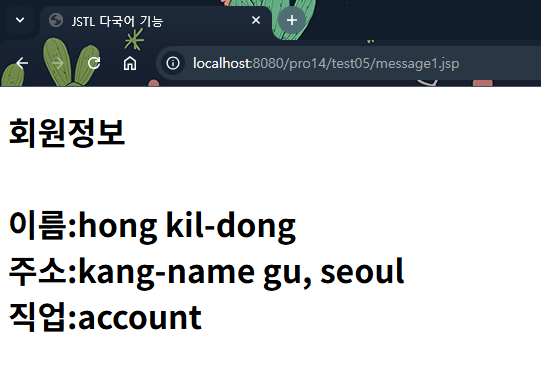
5. 브라우저에서 출력되는 '이름', '주소', '직업'과 JSP 제목(ride)은 여전히 한글로 구현됩니다.
'프로그래밍 언어 > 자바 웹' 카테고리의 다른 글
| 포매팅 태그 라이브러리 사용 실습 (0) | 2026.04.02 |
|---|---|
| 포매팅 태그 라이브러리 (1) | 2026.03.30 |
| 한글 아스키 파일 만들기 (0) | 2026.03.24 |
| 한글을 아스키 코드로 변환하기 - Properties Editor 설치하기 (0) | 2026.03.21 |
| 다국어 태그 라이브러리 사용하기 (0) | 2026.03.18 |