게시판 글쓰기 구현
게시판의 글쓰기 기능을 구현하는 과정은 다음과 같습니다.
① 글 목록 창(listArticles.jsp)에서 글쓰기창을 요청합니다.
② 글쓰기창에서 글을 입력하고 컨트롤러에 /board/addArticle.do로 글쓰기를 요청합니다.
③ 컨트롤러에서 Service 클래스로 글쓰기창에서 입력한 글 정보를 전달해 테이블에 글을 추가합니다.
④ 새 글을 추가하고 컨트롤러에서 다시 /board/listArticles.do로 요청하여 전체 글을 표시합니다.
클래스와 JSP를 구현하기 전에 프로젝트의 WebContent\lib 폴더에 파일 업로드와 관련된 라이브러리를 미리 복사해 붙여넣습니다. 그리고 파일 저장소인 C:\board\article_image 폴더를 만듭니다.

그럼 지금부터 실제 클래스와 JSP로 글쓰기 창에서 글과 이미지 파일을 업로드할 수 있는 기능을 구현해 보겠습니다.
1. sec03.brd02 패키지를 만들고 클래스 파일들을 추가합니다. 그리거 board02 폴더와 관련된 JSP 피일들을 추가합니다.
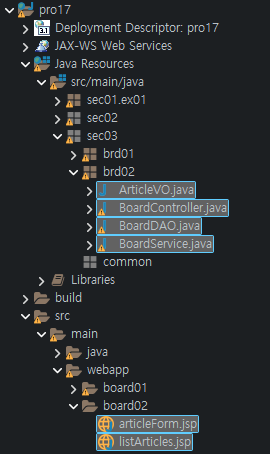
2. 컨트롤러를 담당하는 BoardController 클래스를 다음과 같이 작성합니다. action 값이 /articleForm.do면 글쓰기 창을 브라우저에 표시하고, action 값이 /addArticle.do면 다음 과정을 새 글을 추가합니다. upload() 메서드를 호출해 글쓰기창에서 전송된 글 관련 정보를 Map에 key/value 쌍으로 저장합니다.
파일을 첨부할 경우 먼저 파일 이름을 Map에 저장한 후 첨부한 파일을 저장소에 업로드합니다. upload() 메서드를 호출한 후에는 반환한 Map에서 새 글 정보를 가져옵니다. 그런 다음 Service 클래스의 addArticles() 메서드 인자로 새 글 정보를 전달하면 새 글이 등록됩니다.
package sec03.brd02;

import java.io.File;
import java.io.IOException;
import java.util.ArrayList;
import java.util.HashMap;
import java.util.List;
import java.util.Map;

import javax.servlet.RequestDispatcher;
import javax.servlet.Servlet;
import javax.servlet.ServletConfig;
import javax.servlet.ServletException;
import javax.servlet.annotation.WebServlet;
import javax.servlet.http.HttpServlet;
import javax.servlet.http.HttpServletRequest;
import javax.servlet.http.HttpServletResponse;

import org.apache.commons.fileupload.FileItem;
import org.apache.commons.fileupload.FileUploadException;
import org.apache.commons.fileupload.disk.DiskFileItemFactory;
import org.apache.commons.fileupload.servlet.ServletFileUpload;

/**
 * Servlet implementation class BoardController
 */
/*@WebServlet("/board/*")*/
public class BoardController extends HttpServlet {
	private static String ARTICLE_IMAGE_REPO = "C:\\board\\article_image";
	BoardService boardService;
	ArticleVO articleVO;

	/**
	 * @see Servlet#init(ServletConfig)
	 */
	public void init(ServletConfig config) throws ServletException {
		boardService = new BoardService();
		articleVO = new ArticleVO();
	}

	/**
	 * @see HttpServlet#doGet(HttpServletRequest request, HttpServletResponse
	 *      response)
	 */
	protected void doGet(HttpServletRequest request, HttpServletResponse response)
			throws ServletException, IOException {
		doHandle(request, response);
	}

	/**
	 * @see HttpServlet#doPost(HttpServletRequest request, HttpServletResponse
	 *      response)
	 */
	protected void doPost(HttpServletRequest request, HttpServletResponse response)	throws ServletException, IOException {
		doHandle(request, response);
	}

	private void doHandle(HttpServletRequest request, HttpServletResponse response) throws ServletException, IOException {
		String nextPage = "";
		request.setCharacterEncoding("utf-8");
		response.setContentType("text/html; charset=utf-8");
		String action = request.getPathInfo();
		System.out.println("action:" + action);
		try {
			List<ArticleVO> articlesList = new ArrayList<ArticleVO>();
			if (action == null) {
				articlesList = boardService.listArticles();
				request.setAttribute("articlesList", articlesList);
				nextPage = "/board02/listArticles.jsp";
			} else if (action.equals("/listArticles.do")) {
				articlesList = boardService.listArticles();
				request.setAttribute("articlesList", articlesList);
				nextPage = "/board02/listArticles.jsp";
			} else if (action.equals("/articleForm.do")) {
				nextPage = "/board02/articleForm.jsp";
			} else if (action.equals("/addArticle.do")) {
				Map<String, String> articleMap = upload(request, response);
				String title = articleMap.get("title");
				String content = articleMap.get("content");
				String imageFileName = articleMap.get("imageFileName");

				articleVO.setParentNO(0);
				articleVO.setId("hong");
				articleVO.setTitle(title);
				articleVO.setContent(content);
				articleVO.setImageFileName(imageFileName);
				boardService.addArticle(articleVO);
				nextPage = "/board/listArticles.do";
			}else {
				nextPage = "/board02/listArticles.jsp";
			}

			RequestDispatcher dispatch = request.getRequestDispatcher(nextPage);
			dispatch.forward(request, response);
		} catch (Exception e) {
			e.printStackTrace();
		}
	}

	private Map<String, String> upload(HttpServletRequest request, HttpServletResponse response) throws ServletException, IOException {
		Map<String, String> articleMap = new HashMap<String, String>();
		String encoding = "utf-8";
		File currentDirPath = new File(ARTICLE_IMAGE_REPO);
		DiskFileItemFactory factory = new DiskFileItemFactory();
		factory.setRepository(currentDirPath);
		factory.setSizeThreshold(1024 * 1024);
		ServletFileUpload upload = new ServletFileUpload(factory);
		try {
			List items = upload.parseRequest(request);
			for (int i = 0; i < items.size(); i++) {
				FileItem fileItem = (FileItem) items.get(i);
				if (fileItem.isFormField()) {
					System.out.println(fileItem.getFieldName() + "=" + fileItem.getString(encoding));
					articleMap.put(fileItem.getFieldName(), fileItem.getString(encoding));
				} else {
					System.out.println("파라미터명:" + fileItem.getFieldName());
					//System.out.println("파일명:" + fileItem.getName());
					System.out.println("파일크기:" + fileItem.getSize() + "bytes");
					//articleMap.put(fileItem.getFieldName(), fileItem.getName());
					if (fileItem.getSize() > 0) {
						int idx = fileItem.getName().lastIndexOf("\\");
						if (idx == -1) {
							idx = fileItem.getName().lastIndexOf("/");
						}

						String fileName = fileItem.getName().substring(idx + 1);
						System.out.println("파일명:" + fileName);
						articleMap.put(fileItem.getFieldName(), fileName);  //익스플로러에서 업로드 파일의 경로 제거 후 map에 파일명 저장
						File uploadFile = new File(currentDirPath + "\\" + fileName);
						fileItem.write(uploadFile);

					} // end if
				} // end if
			} // end for
		} catch (Exception e) {
			e.printStackTrace();
		}
		return articleMap;
	}

}
3. BoardVO 클래스의 insertArticle() 메서드를 호출하면서 글 정보를 인자로 전달합니다.
package sec03.brd02;

import java.util.List;

public class BoardService {
	BoardDAO boardDAO;
	public BoardService() {
		boardDAO = new BoardDAO();
	}

	public void addArticle(ArticleVO article) {
		boardDAO.insertNewArticle(article);
	}

	public List<ArticleVO> listArticles() {
		List<ArticleVO> articlesList = boardDAO.selectAllArticles();
		return articlesList;
	}
}
4. insertNewArticle() 메서드의 SQL문을 실행하기 전에 getNewArticleNo() 메서드를 호출해 새 글에 대한 글 번호를 먼저 가져옵니다.
package sec03.brd02;

import java.sql.Connection;
import java.sql.Date;
import java.sql.PreparedStatement;
import java.sql.ResultSet;
import java.util.ArrayList;
import java.util.List;

import javax.naming.Context;
import javax.naming.InitialContext;
import javax.sql.DataSource;

public class BoardDAO {
	private DataSource dataFactory;
	Connection conn;
	PreparedStatement pstmt;

	public BoardDAO() {
		try {
			Context ctx = new InitialContext();
			Context envContext = (Context) ctx.lookup("java:/comp/env");
			dataFactory = (DataSource) envContext.lookup("jdbc/oracle");
		} catch (Exception e) {
			e.printStackTrace();
		}
	}

	public List<ArticleVO> selectAllArticles() {
		List<ArticleVO> articlesList = new ArrayList<ArticleVO>();
		try {
			conn = dataFactory.getConnection();
			String query = "SELECT LEVEL,articleNO,parentNO,title,content,id,writeDate" + " from t_board"
					+ " START WITH  parentNO=0" + " CONNECT BY PRIOR articleNO=parentNO"
					+ " ORDER SIBLINGS BY articleNO DESC";
			System.out.println(query);
			pstmt = conn.prepareStatement(query);
			ResultSet rs = pstmt.executeQuery();
			while (rs.next()) {
				int level = rs.getInt("level");
				int articleNO = rs.getInt("articleNO");
				int parentNO = rs.getInt("parentNO");
				String title = rs.getString("title");
				String content = rs.getString("content");
				String id = rs.getString("id");
				Date writeDate = rs.getDate("writeDate");
				ArticleVO article = new ArticleVO();
				article.setLevel(level);
				article.setArticleNO(articleNO);
				article.setParentNO(parentNO);
				article.setTitle(title);
				article.setContent(content);
				article.setId(id);
				article.setWriteDate(writeDate);
				articlesList.add(article);
			}
			rs.close();
			pstmt.close();
			conn.close();
		} catch (Exception e) {
			e.printStackTrace();
		}
		return articlesList;
	}

	private int getNewArticleNO() {
		try {
			conn = dataFactory.getConnection();
			String query = "SELECT  max(articleNO) from t_board ";
			System.out.println(query);
			pstmt = conn.prepareStatement(query);
			ResultSet rs = pstmt.executeQuery(query);
			if (rs.next())
				return (rs.getInt(1) + 1);
			rs.close();
			pstmt.close();
			conn.close();
		} catch (Exception e) {
			e.printStackTrace();
		}
		return 0;
	}

	public void insertNewArticle(ArticleVO article) {
		try {
			conn = dataFactory.getConnection();
			int articleNO = getNewArticleNO();
			int parentNO = article.getParentNO();
			String title = article.getTitle();
			String content = article.getContent();
			String id = article.getId();
			String imageFileName = article.getImageFileName();
			String query = "INSERT INTO t_board (articleNO, parentNO, title, content, imageFileName, id)"
					+ " VALUES (?, ? ,?, ?, ?, ?)";
			System.out.println(query);
			pstmt = conn.prepareStatement(query);
			pstmt.setInt(1, articleNO);
			pstmt.setInt(2, parentNO);
			pstmt.setString(3, title);
			pstmt.setString(4, content);
			pstmt.setString(5, imageFileName);
			pstmt.setString(6, id);
			pstmt.executeUpdate();
			pstmt.close();
			conn.close();
		} catch (Exception e) {
			e.printStackTrace();
		}
	}

}
5. 다음은 글쓰기와 관련된 JSP 페이지를 작성할 차례입니다. listArticles.jsp를 다음과 같이 작성합니다.
<%@ page language="java" contentType="text/html; charset=UTF-8"
    pageEncoding="UTF-8"
    isELIgnored="false" %>
<%@ taglib prefix="fmt" uri="http://java.sun.com/jsp/jstl/fmt" %>
<%@ taglib prefix="c" uri="http://java.sun.com/jsp/jstl/core" %>
<c:set var="contextPath"  value="${pageContext.request.contextPath}"  />
<%
  request.setCharacterEncoding("UTF-8");
%>
<!DOCTYPE html>
<html>
<head>
 <style>
   .cls1 {text-decoration:none;}
   .cls2{text-align:center; font-size:30px;}
  </style>
  <meta charset="UTF-8">
  <title>글목록창</title>
</head>
<body>
<table align="center" border="1"  width="80%"  >
  <tr height="10" align="center"  bgcolor="lightgreen">
     <td >글번호</td>
     <td >작성자</td>
     <td >제목</td>
     <td >작성일</td>
  </tr>
<c:choose>
  <c:when test="${empty articlesList }" >
    <tr  height="10">
      <td colspan="4">
         <p align="center">
            <b><span style="font-size:9pt;">등록된 글이 없습니다.</span></b>
        </p>
      </td>
    </tr>
  </c:when>
  <c:when test="${!empty  articlesList}" >
    <c:forEach  var="article" items="${articlesList }" varStatus="articleNum" >
     <tr align="center">
	<td width="5%">${articleNum.count}</td>
	<td width="10%">${article.id }</td>
	<td align='left'  width="35%">
	    <span style="padding-right:30px"></span>
	   <c:choose>
	      <c:when test='${article.level > 1 }'>
	         <c:forEach begin="1" end="${article.level }" step="1">
	              <span style="padding-left:10px"></span>
	         </c:forEach>
	         <span style="font-size:12px;">[답변]</span>
                   <a class='cls1' href="${contextPath}/board/viewArticle.do?articleNO=${article.articleNO}">${article.title}</a>
	          </c:when>
	          <c:otherwise>
	            <a class='cls1' href="${contextPath}/board/viewArticle.do?articleNO=${article.articleNO}">${article.title }</a>
	          </c:otherwise>
	        </c:choose>
	  </td>
	  <td  width="10%"><fmt:formatDate value="${article.writeDate}" /></td>
	</tr>
    </c:forEach>
     </c:when>
    </c:choose>
</table>
<a  class="cls1"  href="${contextPath}/board/articleForm.do"><p class="cls2">글쓰기</p></a>
</body>
</html>
6. articleForm.jsp를 다음과 같이 작성합니다. 쇼핑몰 게시판에 글을 쓸때는 보통 사진을 첨부하는 경우가 많죠? 이처럼 글쓰기 작업을 할 때 첨부 파일도 같이 업로드할 수 있도록 반드시 <form> 태그의 enctype 속성을 multipart/form-data로 설정합니다.
<%@ page language="java" contentType="text/html; charset=UTF-8"
     pageEncoding="UTF-8"
    isELIgnored="false" %>
<%@ taglib prefix="fmt" uri="http://java.sun.com/jsp/jstl/fmt" %>
<%@ taglib prefix="c" uri="http://java.sun.com/jsp/jstl/core" %>
<%
  request.setCharacterEncoding("UTF-8");
%>
<c:set var="contextPath"  value="${pageContext.request.contextPath}"  />
<head>
<meta charset="UTF-8">
<title>글쓰기창</title>
<script  src="http://code.jquery.com/jquery-latest.min.js"></script>
<script type="text/javascript">
   function readURL(input) {
      if (input.files && input.files[0]) {
	      var reader = new FileReader();
	      reader.onload = function (e) {
	        $('#preview').attr('src', e.target.result);
          }
         reader.readAsDataURL(input.files[0]);
      }
  }
  function backToList(obj){
    obj.action="${contextPath}/board/listArticles.do";
    obj.submit();
  }

</script>
 <title>새글 쓰기 창</title>
</head>
<body>
<h1 style="text-align:center">새글 쓰기</h1>
  <form name="articleForm" method="post"   action="${contextPath}/board/addArticle.do"   enctype="multipart/form-data">
    <table border=0 align="center">
     <tr>
	   <td align="right">글제목: </td>
	   <td colspan="2"><input type="text" size="67"  maxlength="500" name="title" /></td>
	 </tr>
	 <tr>
		<td align="right" valign="top"><br>글내용: </td>
		<td colspan=2><textarea name="content" rows="10" cols="65" maxlength="4000"></textarea> </td>
     </tr>
     <tr>
        <td align="right">이미지파일 첨부:  </td>
	     <td> <input type="file" name="imageFileName"  onchange="readURL(this);" /></td>
         <td><img  id="preview" src="#"   width=200 height=200/></td>
	 </tr>
	 <tr>
	    <td align="right"> </td>
	    <td colspan="2">
	       <input type="submit" value="글쓰기" />
	       <input type=button value="목록보기"onClick="backToList(this.form)" />
	    </td>
     </tr>
    </table>
  </form>
</body>
</html>
7. /board/listArticle.do로 글 목록창을 요청한 후 다시 글쓰기를 클릭해 board/articleForm.do로 글쓰기창을 요청합니다. 그리고 글쓰기창에서 "상품 후기입니다."라는 새 글을 작성하고 글쓰기를 클릭해 /board/addArticle.do로 요청합니다.
8. 글 목록에 새 글이 추가된 것을 볼 수 있습니다.
9. 글을 작성할 때 첨부한 파일은 로컬 PC의 다음 경로에 업로드됩니다
이번에는 업로드한 파일이 각각의 글 번호를 이름으로 하는 폴더를 생성하고, 저장까지 할 수 있도록 구현해 보겠습니다. 과정은 다음과 같습니다.
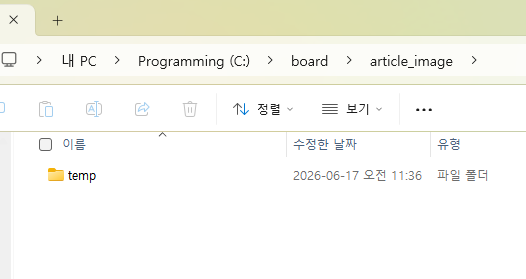
① 글 쓰기 창에서 새 글 전송 시 컨트롤러의 upload() 메서드를 호출해 새 글 정보를 Map으로 반환 받고 첨부한 파일은 임시로 temp 폴더에 업로드합니다.
② 컨트롤러는 Service 클래스의 addNewArticle() 메서드를 호출하면서 새 글 정보를 인자로 전달해 테이블에 추가한 후 새 글 번호를 반환 받습니다.
③ 컨트롤러에서 반환 받은 새 글 번호를 이용해 파일 저장소에 새 글 번호로 폴더를 생성하고 temp 폴더의 파일을 새 글 번호 폴더를 이동합니다.
1. 로컬 PC의 파일 저장소에 temp 폴더를 생성합니다.
2. sec02.brd03 패키지를 만들고 다음과 같이 클래스 파일을 추가합니다.
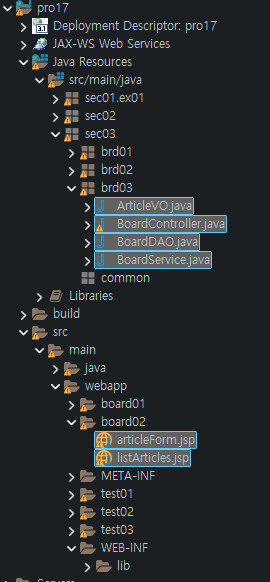
3. BoardController 클래스를 다음과 같이 작성합니다. upload() 메서드를 호출해 첨부한 파일을 temp 폴더에 업로드한 후 새 글 정보를 Map으로 가져옵니다. 그리거 새 글을 테이블에 추가한 후 반환 받은 새 글 번호로 폴더를 생성하고 temp 폴더의 이미지를 새 글 번호 폴더로 이동합니다.
package sec03.brd03;

import java.io.File;
import java.io.IOException;
import java.io.PrintWriter;
import java.util.ArrayList;
import java.util.HashMap;
import java.util.List;
import java.util.Map;

import javax.servlet.RequestDispatcher;
import javax.servlet.Servlet;
import javax.servlet.ServletConfig;
import javax.servlet.ServletException;
import javax.servlet.annotation.WebServlet;
import javax.servlet.http.HttpServlet;
import javax.servlet.http.HttpServletRequest;
import javax.servlet.http.HttpServletResponse;

import org.apache.commons.fileupload.FileItem;
import org.apache.commons.fileupload.disk.DiskFileItemFactory;
import org.apache.commons.fileupload.servlet.ServletFileUpload;
import org.apache.commons.io.FileUtils;

/**
 * Servlet implementation class BoardController
 */
//@WebServlet("/board/*")
public class BoardController extends HttpServlet {
	private static String ARTICLE_IMAGE_REPO = "C:\\board\\article_image";
	BoardService boardService;
	ArticleVO articleVO;

	/**
	 * @see Servlet#init(ServletConfig)
	 */
	public void init(ServletConfig config) throws ServletException {
		boardService = new BoardService();
		articleVO = new ArticleVO();
	}

	/**
	 * @see HttpServlet#doGet(HttpServletRequest request, HttpServletResponse
	 *      response)
	 */
	protected void doGet(HttpServletRequest request, HttpServletResponse response)
			throws ServletException, IOException {
		doHandle(request, response);
	}

	/**
	 * @see HttpServlet#doPost(HttpServletRequest request, HttpServletResponse
	 *      response)
	 */
	protected void doPost(HttpServletRequest request, HttpServletResponse response)	throws ServletException, IOException {
		doHandle(request, response);
	}

	private void doHandle(HttpServletRequest request, HttpServletResponse response) throws ServletException, IOException {
		String nextPage = "";
		request.setCharacterEncoding("utf-8");
		response.setContentType("text/html; charset=utf-8");
		String action = request.getPathInfo();
		System.out.println("action:" + action);
		try {
			List<ArticleVO> articlesList = new ArrayList<ArticleVO>();
			if (action == null) {
				articlesList = boardService.listArticles();
				request.setAttribute("articlesList", articlesList);
				nextPage = "/board02/listArticles.jsp";
			} else if (action.equals("/listArticles.do")) {
				articlesList = boardService.listArticles();
				request.setAttribute("articlesList", articlesList);
				nextPage = "/board02/listArticles.jsp";
			} else if (action.equals("/articleForm.do")) {
				nextPage = "/board02/articleForm.jsp";
			} else if (action.equals("/addArticle.do")) {
				int articleNO=0;
				Map<String, String> articleMap = upload(request, response);
				String title = articleMap.get("title");
				String content = articleMap.get("content");
				String imageFileName = articleMap.get("imageFileName");
				articleVO.setParentNO(0);
				articleVO.setId("hong");
				articleVO.setTitle(title);
				articleVO.setContent(content);
				articleVO.setImageFileName(imageFileName);
				articleNO= boardService.addArticle(articleVO);

				if(imageFileName!=null && imageFileName.length()!=0) {
				    File srcFile = new 	File(ARTICLE_IMAGE_REPO +"\\"+"temp"+"\\"+imageFileName);
					File destDir = new File(ARTICLE_IMAGE_REPO +"\\"+articleNO);
					destDir.mkdirs();
					FileUtils.moveFileToDirectory(srcFile, destDir, true);
				}
				PrintWriter pw = response.getWriter();
				pw.print("<script>"
				         +"  alert('새글을 추가했습니다.');"
						 +" location.href='"+request.getContextPath()+"/board/listArticles.do';"
				         +"</script>");

				return;
			}else {
				nextPage = "/board02/listArticles.jsp";
			}

			RequestDispatcher dispatch = request.getRequestDispatcher(nextPage);
			dispatch.forward(request, response);
		} catch (Exception e) {
			e.printStackTrace();
		}
	}

	private Map<String, String> upload(HttpServletRequest request, HttpServletResponse response) throws ServletException, IOException {
		Map<String, String> articleMap = new HashMap<String, String>();
		String encoding = "utf-8";
		File currentDirPath = new File(ARTICLE_IMAGE_REPO);
		DiskFileItemFactory factory = new DiskFileItemFactory();
		factory.setRepository(currentDirPath);
		factory.setSizeThreshold(1024 * 1024);
		ServletFileUpload upload = new ServletFileUpload(factory);
		try {
			List items = upload.parseRequest(request);
			for (int i = 0; i < items.size(); i++) {
				FileItem fileItem = (FileItem) items.get(i);
				if (fileItem.isFormField()) {
					System.out.println(fileItem.getFieldName() + "=" + fileItem.getString(encoding));
					articleMap.put(fileItem.getFieldName(), fileItem.getString(encoding));
				} else {
					System.out.println("파라미터명:" + fileItem.getFieldName());
					//System.out.println("파일명:" + fileItem.getName());
					System.out.println("파일크기:" + fileItem.getSize() + "bytes");
					//articleMap.put(fileItem.getFieldName(), fileItem.getName());
					if (fileItem.getSize() > 0) {
						int idx = fileItem.getName().lastIndexOf("\\");
						if (idx == -1) {
							idx = fileItem.getName().lastIndexOf("/");
						}

						String fileName = fileItem.getName().substring(idx + 1);
						System.out.println("파일명:" + fileName);
						articleMap.put(fileItem.getFieldName(), fileName);  //익스플로러에서 업로드 파일의 경로 제거 후 map에 파일명 저장
						File uploadFile = new File(currentDirPath + "\\temp\\" + fileName);
						fileItem.write(uploadFile);

					} // end if
				} // end if
			} // end for
		} catch (Exception e) {
			e.printStackTrace();
		}
		return articleMap;
	}

}
4. BoardService 클래스를 다음과 같이 addArticle() 메서드의 반환 타입은 int 로 변경합니다. 그리고 BoardDAO의 insertNewArticle() 메서드를 호출해 새 글 번호를 받아서 반환합니다.
package sec03.brd03;

import java.util.List;

public class BoardService {
	BoardDAO boardDAO;
	public BoardService() {
		boardDAO = new BoardDAO();
	}

	public int addArticle(ArticleVO article) {
		 return boardDAO.insertNewArticle(article);
	}

	public List<ArticleVO> listArticles() {
		List<ArticleVO> articlesList = boardDAO.selectAllArticles();
		return articlesList;
	}
}
5. BoardDAO 클래스에서는 insertNewArticle() 메서드를 호출해 SQL문을 실행한 후 새 글 번호를 반환합니다.
package sec03.brd03;

import java.sql.Connection;
import java.sql.Date;
import java.sql.PreparedStatement;
import java.sql.ResultSet;
import java.util.ArrayList;
import java.util.List;

import javax.naming.Context;
import javax.naming.InitialContext;
import javax.sql.DataSource;

public class BoardDAO {
	private DataSource dataFactory;
	Connection conn;
	PreparedStatement pstmt;

	public BoardDAO() {
		try {
			Context ctx = new InitialContext();
			Context envContext = (Context) ctx.lookup("java:/comp/env");
			dataFactory = (DataSource) envContext.lookup("jdbc/oracle");
		} catch (Exception e) {
			e.printStackTrace();
		}
	}

	public List<ArticleVO> selectAllArticles() {
		List<ArticleVO> articlesList = new ArrayList<ArticleVO>();
		try {
			conn = dataFactory.getConnection();
			String query = "SELECT LEVEL,articleNO,parentNO,title,content,id,writeDate" + " from t_board"
					+ " START WITH  parentNO=0" + " CONNECT BY PRIOR articleNO=parentNO"
					+ " ORDER SIBLINGS BY articleNO DESC";
			System.out.println(query);
			pstmt = conn.prepareStatement(query);
			ResultSet rs = pstmt.executeQuery();
			while (rs.next()) {
				int level = rs.getInt("level");
				int articleNO = rs.getInt("articleNO");
				int parentNO = rs.getInt("parentNO");
				String title = rs.getString("title");
				String content = rs.getString("content");
				String id = rs.getString("id");
				Date writeDate = rs.getDate("writeDate");
				ArticleVO article = new ArticleVO();
				article.setLevel(level);
				article.setArticleNO(articleNO);
				article.setParentNO(parentNO);
				article.setTitle(title);
				article.setContent(content);
				article.setId(id);
				article.setWriteDate(writeDate);
				articlesList.add(article);
			}
			rs.close();
			pstmt.close();
			conn.close();
		} catch (Exception e) {
			e.printStackTrace();
		}
		return articlesList;
	}

	private int getNewArticleNO() {
		try {
			conn = dataFactory.getConnection();
			String query = "SELECT  max(articleNO) from t_board ";
			System.out.println(query);
			pstmt = conn.prepareStatement(query);
			ResultSet rs = pstmt.executeQuery(query);
			if (rs.next())
				return (rs.getInt(1) + 1);
			rs.close();
			pstmt.close();
			conn.close();
		} catch (Exception e) {
			e.printStackTrace();
		}
		return 0;
	}

	public int insertNewArticle(ArticleVO article) {
		int articleNO = getNewArticleNO();
		try {
			conn = dataFactory.getConnection();
			int parentNO = article.getParentNO();
			String title = article.getTitle();
			String content = article.getContent();
			String id = article.getId();
			String imageFileName = article.getImageFileName();
			String query = "INSERT INTO t_board (articleNO, parentNO, title, content, imageFileName, id)"
					+ " VALUES (?, ? ,?, ?, ?, ?)";
			System.out.println(query);
			pstmt = conn.prepareStatement(query);
			pstmt.setInt(1, articleNO);
			pstmt.setInt(2, parentNO);
			pstmt.setString(3, title);
			pstmt.setString(4, content);
			pstmt.setString(5, imageFileName);
			pstmt.setString(6, id);
			pstmt.executeUpdate();
			pstmt.close();
			conn.close();
		} catch (Exception e) {
			e.printStackTrace();
		}

		return articleNO;
	}

}
6. 새 글 쓰기를 실행하면 파일 저장소가 나타날 것입니다.
임시로 저장하는 temp 폴더 외에도 각각의 글 번호에 대한 폴더가 만들어진 것을 볼 수 있습니다.
'프로그래밍 언어 > 자바 웹' 카테고리의 다른 글
| 글 수정 기능 구현 (0) | 2026.06.23 |
|---|---|
| 글 상세 기능 구현 (0) | 2026.06.20 |
| 모델2로 답변형 게시판 구현하기 (0) | 2026.06.14 |
| 회원 정보 수정 및 삭제 기능 구현 (0) | 2026.06.11 |
| 회원 정보 추가 기능 구현 (0) | 2026.06.08 |