글 수정 기능 구현
이번에는 기존에 작성한 글을 수정하는 기능을 구현해 보겠습니다.
글 수정 기능을 구현하는 과정은 다음과 같습니다.
① 글 상세창(viewArticle.jsp)에서 수정하기를 클릭해 글 정보를 표시하는 입력창들을 활성화합니다.
② 글 정보와 이미지를 수정한 후 수정반역하기를 클릭해 컨트롤러에 /board/modArticle.do로 요청합니다.
③ 컨트롤러는 요청애 대해 upload() 메서드를 이용하여 수정된 데이터를 Map에 저장하고 반환합니다.
④ 컨트롤러는 수정된 데이터를 테이블에 반영한 후 temp 폴더에 업로드된 수정 이미지를 글 번호 폴더로 이동합니다.
⑤ 마지막으로 글 번호 폴더에 있던 원래 이미지 파일을 삭제합니다.
1. sec03.brd05 패키지를 만들고 글 수정 기능과 관련된 클래스를 다음과 같이 추가합니다.
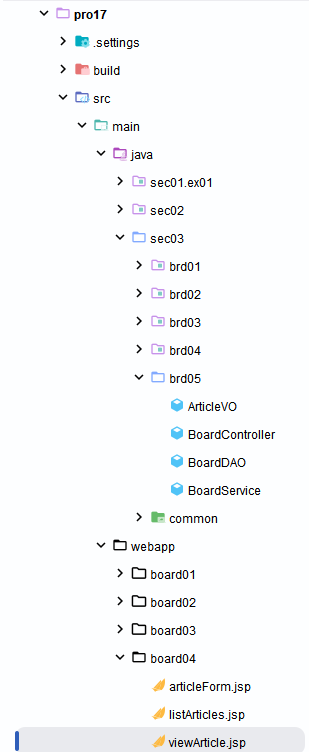
2. BoardController 클래스를 다음과 같이 작성합니다. 컨트롤러에서 수정을 요청하면 upload() 메서드를 이용해 수정 데이터를 Map으로 가져옵니다. Map의 데이터를 다시 ArticleVO 객체의 속성에 저장한 후 SQL문으로 전달하여 수정 데이터를 반영합니다. 마지막으로 temp 폴더에 업로드된 수정 이미지를 다시 글 번호 폴더로 이동하고 글 번호 폴더의 원래 이미지를 삭제합니다.
package sec03.brd05;

import java.io.File;
import java.io.IOException;
import java.io.PrintWriter;
import java.util.ArrayList;
import java.util.HashMap;
import java.util.List;
import java.util.Map;

import javax.servlet.RequestDispatcher;
import javax.servlet.Servlet;
import javax.servlet.ServletConfig;
import javax.servlet.ServletException;
import javax.servlet.annotation.WebServlet;
import javax.servlet.http.HttpServlet;
import javax.servlet.http.HttpServletRequest;
import javax.servlet.http.HttpServletResponse;

import org.apache.commons.fileupload.FileItem;
import org.apache.commons.fileupload.disk.DiskFileItemFactory;
import org.apache.commons.fileupload.servlet.ServletFileUpload;
import org.apache.commons.io.FileUtils;

/**
 * Servlet implementation class BoardController
 */

@WebServlet("/board/*")
public class BoardController extends HttpServlet {
    private static String ARTICLE_IMAGE_REPO = "C:\\board\\article_image";
    BoardService boardService;
    ArticleVO articleVO;

    /**
     * @see Servlet#init(ServletConfig)
     */
    public void init(ServletConfig config) throws ServletException {
        boardService = new BoardService();
        articleVO = new ArticleVO();
    }

    /**
     * @see HttpServlet#doGet(HttpServletRequest request, HttpServletResponse
     *      response)
     */
    protected void doGet(HttpServletRequest request, HttpServletResponse response) throws ServletException, IOException {
        doHandle(request, response);
    }

    /**
     * @see HttpServlet#doPost(HttpServletRequest request, HttpServletResponse
     *      response)
     */
    protected void doPost(HttpServletRequest request, HttpServletResponse response) throws ServletException, IOException {
        doHandle(request, response);
    }

    private void doHandle(HttpServletRequest request, HttpServletResponse response) throws ServletException, IOException {
        String nextPage = "";
        request.setCharacterEncoding("utf-8");
        response.setContentType("text/html; charset=utf-8");
        String action = request.getPathInfo();
        System.out.println("action:" + action);
        try {
            List<ArticleVO> articlesList = new ArrayList<ArticleVO>();
            if (action == null) {
                articlesList = boardService.listArticles();
                request.setAttribute("articlesList", articlesList);
                nextPage = "/board04/listArticles.jsp";
            } else if (action.equals("/listArticles.do")) {
                articlesList = boardService.listArticles();
                request.setAttribute("articlesList", articlesList);
                nextPage = "/board04/listArticles.jsp";
            } else if (action.equals("/articleForm.do")) {
                nextPage = "/board04/articleForm.jsp";
            } else if (action.equals("/addArticle.do")) {
                int articleNO = 0;
                Map<String, String> articleMap = upload(request, response);
                String title = articleMap.get("title");
                String content = articleMap.get("content");
                String imageFileName = articleMap.get("imageFileName");

                articleVO.setParentNO(0);
                articleVO.setId("hong");
                articleVO.setTitle(title);
                articleVO.setContent(content);
                articleVO.setImageFileName(imageFileName);
                articleNO = boardService.addArticle(articleVO);
                if (imageFileName != null && imageFileName.length() != 0) {
                    File srcFile = new File(ARTICLE_IMAGE_REPO + "\\" + "temp" + "\\" + imageFileName);
                    File destDir = new File(ARTICLE_IMAGE_REPO + "\\" + articleNO);
                    destDir.mkdirs();
                    FileUtils.moveFileToDirectory(srcFile, destDir, true);
                    srcFile.delete();
                }
                PrintWriter pw = response.getWriter();
                pw.print("<script>" + "  alert('새글을 추가했습니다.');" + " location.href='" + request.getContextPath()
                        + "/board/listArticles.do';" + "</script>");

                return;
            } else if (action.equals("/viewArticle.do")) {
                String articleNO = request.getParameter("articleNO");
                articleVO = boardService.viewArticle(Integer.parseInt(articleNO));
                request.setAttribute("article", articleVO);
                nextPage = "/board04/viewArticle.jsp";
            } else if (action.equals("/modArticle.do")) {
                Map<String, String> articleMap = upload(request, response);
                int articleNO = Integer.parseInt(articleMap.get("articleNO"));
                articleVO.setArticleNO(articleNO);
                String title = articleMap.get("title");
                String content = articleMap.get("content");
                String imageFileName = articleMap.get("imageFileName");
                articleVO.setParentNO(0);
                articleVO.setId("hong");
                articleVO.setTitle(title);
                articleVO.setContent(content);
                articleVO.setImageFileName(imageFileName);
                boardService.modArticle(articleVO);
                if (imageFileName != null && imageFileName.length() != 0) {
                    String originalFileName = articleMap.get("originalFileName");
                    File srcFile = new File(ARTICLE_IMAGE_REPO + "\\" + "temp" + "\\" + imageFileName);
                    File destDir = new File(ARTICLE_IMAGE_REPO + "\\" + articleNO);
                    destDir.mkdirs();
                    FileUtils.moveFileToDirectory(srcFile, destDir, true);
                    ;
                    File oldFile = new File(ARTICLE_IMAGE_REPO + "\\" + articleNO + "\\" + originalFileName);
                    oldFile.delete();
                }
                PrintWriter pw = response.getWriter();
                pw.print("<script>" + "  alert('글을 수정했습니다.');" + " location.href='" + request.getContextPath()
                        + "/board/viewArticle.do?articleNO=" + articleNO + "';" + "</script>");
                return;

            }else {
                nextPage = "/board04/listArticles.jsp";
            }

            RequestDispatcher dispatch = request.getRequestDispatcher(nextPage);
            dispatch.forward(request, response);
        } catch (Exception e) {
            e.printStackTrace();
        }
    }

    private Map<String, String> upload(HttpServletRequest request, HttpServletResponse response)
            throws ServletException, IOException {
        Map<String, String> articleMap = new HashMap<String, String>();
        String encoding = "utf-8";
        File currentDirPath = new File(ARTICLE_IMAGE_REPO);
        DiskFileItemFactory factory = new DiskFileItemFactory();
        factory.setRepository(currentDirPath);
        factory.setSizeThreshold(1024 * 1024);
        ServletFileUpload upload = new ServletFileUpload(factory);
        try {
            List items = upload.parseRequest(request);
            for (int i = 0; i < items.size(); i++) {
                FileItem fileItem = (FileItem) items.get(i);
                if (fileItem.isFormField()) {
                    System.out.println(fileItem.getFieldName() + "=" + fileItem.getString(encoding));
                    articleMap.put(fileItem.getFieldName(), fileItem.getString(encoding));
                } else {
                    System.out.println("파라미터명:" + fileItem.getFieldName());
                    //System.out.println("파일명:" + fileItem.getName());
                    System.out.println("파일크기:" + fileItem.getSize() + "bytes");
                    //articleMap.put(fileItem.getFieldName(), fileItem.getName());
                    if (fileItem.getSize() > 0) {
                        int idx = fileItem.getName().lastIndexOf("\\");
                        if (idx == -1) {
                            idx = fileItem.getName().lastIndexOf("/");
                        }

                        String fileName = fileItem.getName().substring(idx + 1);
                        System.out.println("파일명:" + fileName);
                        articleMap.put(fileItem.getFieldName(), fileName);  //익스플로러에서 업로드 파일의 경로 제거 후 map에 파일명 저장
                        File uploadFile = new File(currentDirPath + "\\temp\\" + fileName);
                        fileItem.write(uploadFile);

                    } // end if
                } // end if
            } // end for
        } catch (Exception e) {
            e.printStackTrace();
        }
        return articleMap;
    }

}
3. BoardService 클래스를 다음과 같이 작성합니다. 컨트롤러에서 modArticle() 메서드를 호출하면 다시 BoardDAO의 updateArticle() 메서드를 호출하면서 수정 데이터를 전달합니다.
package sec03.brd05;

import java.util.List;

public class BoardService {
    BoardDAO boardDAO;

    public BoardService() {
        boardDAO = new BoardDAO();
    }

    public List<ArticleVO> listArticles() {
        List<ArticleVO> articlesList = boardDAO.selectAllArticles();
        return articlesList;
    }

    public int addArticle(ArticleVO article) {
        return boardDAO.insertNewArticle(article);
    }

    public ArticleVO viewArticle(int articleNO) {
        ArticleVO article = null;
        article = boardDAO.selectArticle(articleNO);
        return article;
    }

    public void modArticle(ArticleVO article) {
        boardDAO.updateArticle(article);
    }
}
4. BoardDAO 클래스를 다음과 같이 작성합니다. 전달된 수정 데이터에 대해 이미지 파일을 수정하지 않는 경우를 동적으로 SQL문을 생성하여 수정 데이터를 반영합니다.
package sec03.brd05;

import java.net.URLEncoder;
import java.sql.Connection;
import java.sql.Date;
import java.sql.PreparedStatement;
import java.sql.ResultSet;
import java.util.ArrayList;
import java.util.List;

import javax.naming.Context;
import javax.naming.InitialContext;
import javax.sql.DataSource;


public class BoardDAO {
    private DataSource dataFactory;
    Connection conn;
    PreparedStatement pstmt;

    public BoardDAO() {
        try {
            Context ctx = new InitialContext();
            Context envContext = (Context) ctx.lookup("java:/comp/env");
            dataFactory = (DataSource) envContext.lookup("jdbc/oracle");
        } catch (Exception e) {
            e.printStackTrace();
        }
    }

    public List<ArticleVO> selectAllArticles() {
        List<ArticleVO> articlesList = new ArrayList<ArticleVO>();
        try {
            conn = dataFactory.getConnection();
            String query = "SELECT LEVEL,articleNO,parentNO,title,content,id,writeDate" + " from t_board"
                    + " START WITH  parentNO=0" + " CONNECT BY PRIOR articleNO=parentNO"
                    + " ORDER SIBLINGS BY articleNO DESC";
            System.out.println(query);
            pstmt = conn.prepareStatement(query);
            ResultSet rs = pstmt.executeQuery();
            while (rs.next()) {
                int level = rs.getInt("level");
                int articleNO = rs.getInt("articleNO");
                int parentNO = rs.getInt("parentNO");
                String title = rs.getString("title");
                String content = rs.getString("content");
                String id = rs.getString("id");
                Date writeDate = rs.getDate("writeDate");
                ArticleVO article = new ArticleVO();
                article.setLevel(level);
                article.setArticleNO(articleNO);
                article.setParentNO(parentNO);
                article.setTitle(title);
                article.setContent(content);
                article.setId(id);
                article.setWriteDate(writeDate);
                articlesList.add(article);
            }
            rs.close();
            pstmt.close();
            conn.close();
        } catch (Exception e) {
            e.printStackTrace();
        }
        return articlesList;
    }

    private int getNewArticleNO() {
        try {
            conn = dataFactory.getConnection();
            String query = "SELECT  max(articleNO) from t_board ";
            System.out.println(query);
            pstmt = conn.prepareStatement(query);
            ResultSet rs = pstmt.executeQuery(query);
            if (rs.next())
                return (rs.getInt(1) + 1);
            rs.close();
            pstmt.close();
            conn.close();
        } catch (Exception e) {
            e.printStackTrace();
        }
        return 0;
    }

    public int insertNewArticle(ArticleVO article) {
        int articleNO = getNewArticleNO();
        try {
            conn = dataFactory.getConnection();
            int parentNO = article.getParentNO();
            String title = article.getTitle();
            String content = article.getContent();
            String id = article.getId();
            String imageFileName = article.getImageFileName();
            String query = "INSERT INTO t_board (articleNO, parentNO, title, content, imageFileName, id)"
                    + " VALUES (?, ? ,?, ?, ?, ?)";
            System.out.println(query);
            pstmt = conn.prepareStatement(query);
            pstmt.setInt(1, articleNO);
            pstmt.setInt(2, parentNO);
            pstmt.setString(3, title);
            pstmt.setString(4, content);
            pstmt.setString(5, imageFileName);
            pstmt.setString(6, id);
            pstmt.executeUpdate();
            pstmt.close();
            conn.close();
        } catch (Exception e) {
            e.printStackTrace();
        }

        return articleNO;
    }

    public ArticleVO selectArticle(int articleNO) {
        ArticleVO article = new ArticleVO();
        try {
            conn = dataFactory.getConnection();
            String query = "select articleNO,parentNO,title,content, NVL(imageFileName, 'null') as imageFileName,id, writeDate" + " from t_board"
                    + " where articleNO=?";
            System.out.println(query);
            pstmt = conn.prepareStatement(query);
            pstmt.setInt(1, articleNO);
            ResultSet rs = pstmt.executeQuery();
            rs.next();
            int _articleNO = rs.getInt("articleNO");
            int parentNO = rs.getInt("parentNO");
            String title = rs.getString("title");
            String content = rs.getString("content");
            String imageFileName = URLEncoder.encode(rs.getString("imageFileName"), "UTF-8"); //�����̸��� Ư�����ڰ� ���� ��� ���ڵ��մϴ�.
            if(imageFileName.equals("null")) {
                imageFileName = null;
            }

            String id = rs.getString("id");
            Date writeDate = rs.getDate("writeDate");

            article.setArticleNO(_articleNO);
            article.setParentNO(parentNO);
            article.setTitle(title);
            article.setContent(content);
            article.setImageFileName(imageFileName);
            article.setId(id);
            article.setWriteDate(writeDate);
            rs.close();
            pstmt.close();
            conn.close();
        } catch (Exception e) {
            e.printStackTrace();
        }
        return article;
    }

    public void updateArticle(ArticleVO article) {
        int articleNO = article.getArticleNO();
        String title = article.getTitle();
        String content = article.getContent();
        String imageFileName = article.getImageFileName();
        try {
            conn = dataFactory.getConnection();
            String query = "update t_board  set title=?,content=?";
            if (imageFileName != null && imageFileName.length() != 0) {
                query += ",imageFileName=?";
            }
            query += " where articleNO=?";

            System.out.println(query);
            pstmt = conn.prepareStatement(query);
            pstmt.setString(1, title);
            pstmt.setString(2, content);
            if (imageFileName != null && imageFileName.length() != 0) {
                pstmt.setString(3, imageFileName);
                pstmt.setInt(4, articleNO);
            } else {
                pstmt.setInt(3, articleNO);
            }
            pstmt.executeUpdate();
            pstmt.close();
            conn.close();
        } catch (Exception e) {
            e.printStackTrace();
        }
    }

}
5. viewArticle.jsp를 다음과 같이 작성합니다. 수정하기를 클릭해 fn_enable() 함수를 호출하여 비활성화된 텍스트 박스를 수정할 수 있도록 활성화시킵니다. 또한 글 정보와 이미지를 수정한 후 수정반영하기를 클릭하면 fn_modify_article() 함수를 호출하여 컨트롤러로 수정 데이터를 전송합니다.
<%@ page language="java" contentType="text/html; charset=UTF-8"
         pageEncoding="UTF-8"
         isELIgnored="false" %>
<%@ taglib prefix="fmt" uri="http://java.sun.com/jsp/jstl/fmt" %>
<%@ taglib prefix="c" uri="http://java.sun.com/jsp/jstl/core" %>
<%
    request.setCharacterEncoding("UTF-8");
%>
<c:set var="contextPath"  value="${pageContext.request.contextPath}"  />
<head>
    <meta charset="UTF-8">
    <title>글보기</title>
    <style>
        #tr_btn_modify{
            display:none;
        }

    </style>
    <script  src="http://code.jquery.com/jquery-latest.min.js"></script>
    <c:choose>
        <c:when test="${not empty article.imageFileName && article.imageFileName!='null' }">
            <script type="text/javascript" >
                function fn_enable(obj){
                    document.getElementById("i_title").disabled=false;
                    document.getElementById("i_content").disabled=false;
                    document.getElementById("i_imageFileName").disabled=false;
                    document.getElementById("tr_btn_modify").style.display="block";
                    document.getElementById("tr_btn").style.display="none";
                }
            </script>
        </c:when>
        <c:otherwise>
            <script type="text/javascript" >
                function fn_enable(obj){
                    document.getElementById("i_title").disabled=false;
                    document.getElementById("i_content").disabled=false;

                    document.getElementById("tr_btn_modify").style.display="block";
                    document.getElementById("tr_btn").style.display="none";
                }
            </script>
        </c:otherwise>
    </c:choose>


    <script type="text/javascript" >
        function backToList(obj){
            obj.action="${contextPath}/board/listArticles.do";
            obj.submit();
        }

        /*
        function fn_enable(obj){
            document.getElementById("i_title").disabled=false;
            document.getElementById("i_content").disabled=false;

            document.getElementById("i_imageFileName").disabled=false;
            document.getElementById("tr_btn_modify").style.display="block";
            document.getElementById("tr_btn").style.display="none";
        }
        */
        function fn_modify_article(obj){
            obj.action="${contextPath}/board/modArticle.do";
            obj.submit();
        }

        function fn_remove_article(url,articleNO){
            var form = document.createElement("form");
            form.setAttribute("method", "post");
            form.setAttribute("action", url);
            var articleNOInput = document.createElement("input");
            articleNOInput.setAttribute("type","hidden");
            articleNOInput.setAttribute("name","articleNO");
            articleNOInput.setAttribute("value", articleNO);

            form.appendChild(articleNOInput);
            document.body.appendChild(form);
            form.submit();

        }

        function readURL(input) {
            if (input.files && input.files[0]) {
                var reader = new FileReader();
                reader.onload = function (e) {
                    $('#preview').attr('src', e.target.result);
                }
                reader.readAsDataURL(input.files[0]);
            }
        }
    </script>
</head>
<body>
<form name="frmArticle" method="post"  action="${contextPath}"  enctype="multipart/form-data">
    <table  border="0" align="center" >
        <tr>
            <td width="150" align="center" bgcolor="#FF9933">
                글번호
            </td>
            <td >
                <input type="text"  value="${article.articleNO }"  disabled />
                <input type="hidden" name="articleNO" value="${article.articleNO}"  />
            </td>
        </tr>
        <tr>
            <td width="150" align="center" bgcolor="#FF9933">
                작성자 아이디
            </td>
            <td >
                <input type=text value="${article.id }" name="writer"  disabled />
            </td>
        </tr>
        <tr>
            <td width="150" align="center" bgcolor="#FF9933">
                제목
            </td>
            <td>
                <input type="text" value="${article.title }"  name="title"  id="i_title" disabled />
            </td>
        </tr>
        <tr>
            <td width="150" align="center" bgcolor="#FF9933">
                내용
            </td>
            <td>
                <textarea rows="20" cols="60"  name="content"  id="i_content"  disabled />${article.content }</textarea>
            </td>
        </tr>

        <c:if test="${not empty article.imageFileName && article.imageFileName!='null' }">
            <tr>
                <td width="150" align="center" bgcolor="#FF9933"  rowspan="2">
                    이미지
                </td>
                <td>
                    <input  type= "hidden"   name="originalFileName" value="${article.imageFileName }" />
                    <img src="${contextPath}/download.do?articleNO=${article.articleNO}&imageFileName=${article.imageFileName}" id="preview"  /><br>

                </td>
            </tr>
            <tr>
                <td>
                    <input  type="file"  name="imageFileName " id="i_imageFileName"   disabled   onchange="readURL(this);"   />
                </td>
            </tr>
        </c:if>
        <tr>
            <td width="150" align="center" bgcolor="#FF9933">
                등록일자
            </td>
            <td>
                <input type=text value="<fmt:formatDate value="${article.writeDate}" />" disabled />
            </td>
        </tr>
        <tr   id="tr_btn_modify"  >
            <td colspan="2"   align="center" >
                <input type=button value="수정반영하기"   onClick="fn_modify_article(frmArticle)"  >
                <input type=button value="취소"  onClick="backToList(frmArticle)">
            </td>
        </tr>

        <tr  id="tr_btn"    >
            <td colspan=2 align=center>
                <input type=button value="수정하기" onClick="fn_enable(this.form)">
                <input type=button value="삭제하기" onClick="fn_remove_article('${contextPath}/board/removeArticle.do', ${article.articleNO})">
                <input type=button value="리스트로 돌아가기"  onClick="backToList(this.form)">
                <input type=button value="답글쓰기"  onClick="fn_reply_form('${contextPath}/board/replyForm.do', ${article.articleNO})">
            </td>
        </tr>
    </table>
</form>
</body>
</html>
6. 글 상세창에서 수정하기를 클릭해 글 정보가 표시된 텍스트 박스를 활성화시킵니다.
7. 글 정보와 이미지 파일을 수정한 후 수정반영하기를 클릭해 /board/modArticle.do로 요청합니다.
8. 글 수정 후 수정된 내용으로 글 상세 화면에 표시합니다.
'프로그래밍 언어 > 자바 웹' 카테고리의 다른 글
| 글 삭제 기능 구현 (0) | 2026.06.26 |
|---|---|
| 글 상세 기능 구현 (0) | 2026.06.20 |
| 게시판 글쓰기 구현 (0) | 2026.06.17 |
| 모델2로 답변형 게시판 구현하기 (0) | 2026.06.14 |
| 회원 정보 수정 및 삭제 기능 구현 (0) | 2026.06.11 |